ORTB
…
SIMID 分册导航

SIMID 1.2.0

现行版本

规范自标版本 1.2.0 · 发布口径 2026-07-23 · 源文件 SIMID 1.2.md

官方 Markdown 正文不标注发布日期;取 SIMID 1.2.md 在仓库中的首次提交日期(GitHub commits?path 核实为 2026-07-23)

本页正文为该版官方原文照录;参数结构取自正文里的 WebIDL 代码块。

本页目录

消息总表

官方 §4.1 的 API / resolve / reject 对照表;站内另有按消息展开的参数树,可点行内消息名跳转。

SIMID API is a set of messages and data structures that ad-rendering parties exchange via § 8 Messaging Protocol.

APIresolvereject
SIMID:Media:durationchangen/an/a
SIMID:Media:endedn/an/a
SIMID:Media:errorn/an/a
SIMID:Media:pausen/an/a
SIMID:Media:playn/an/a
SIMID:Media:playingn/an/a
SIMID:Media:seekedn/an/a
SIMID:Media:seekingn/an/a
SIMID:Media:stalledn/an/a
SIMID:Media:timeupdaten/an/a
SIMID:Media:volumechangen/an/a
SIMID:Player:adSkipped§ 4.3.1.1 resolven/a
SIMID:Player:adStopped§ 4.3.2.1 resolven/a
SIMID:Player:appBackgrounded§ 4.3.3.1 resolven/a
SIMID:Player:appForegroundedn/an/a
SIMID:Player:collapseNonlinearn/an/a
SIMID:Player:fatalError§ 4.3.6.1 resolven/a
SIMID:Player:init§ 4.3.7.1 resolve§ 4.3.7.2 reject
SIMID:Player:logn/an/a
SIMID:Player:resizen/an/a
SIMID:Player:startCreative§ 4.3.10.1 resolve§ 4.3.10.2 reject
SIMID:Creative:clickThrun/an/a
SIMID:Creative:collapseNonlinear§ 4.4.2.1 resolven/a
SIMID:Creative:expandNonlinear§ 4.4.3.1 resolve§ 4.4.3.2 reject
SIMID:Creative:fatalErrorn/an/a
SIMID:Creative:getMediaState§ 4.4.5.1 resolven/a
SIMID:Creative:logn/an/a
SIMID:Creative:reportTracking§ 4.4.7.1 resolve§ 4.4.7.2 reject
SIMID:Creative:requestChangeAdDuration§ 4.4.8.1 resolve§ 4.4.8.2 reject
SIMID:Creative:requestChangeVolume§ 4.4.9.1 resolve§ 4.4.9.2 reject
SIMID:Creative:requestFullscreen§ 4.4.10.1 resolve§ 4.4.10.2 reject
SIMID:Creative:requestExitFullscreen§ 4.4.11.1 resolve§ 4.4.11.2 reject
SIMID:Creative:requestPause§ 4.4.13.1 resolve§ 4.4.13.2 reject
SIMID:Creative:requestPlay§ 4.4.14.1 resolve§ 4.4.14.2 reject
SIMID:Creative:requestResize§ 4.4.15.1 resolve§ 4.4.15.2 reject
SIMID:Creative:requestSkip§ 4.4.16.1 resolve§ 4.4.16.2 reject
SIMID:Creative:requestStop§ 4.4.17.1 resolve§ 4.4.17.2 reject

SIMID:Media · 媒体事件

SIMID specifies a group of messages that describe ad media states. The player prepends such messages with the SIMID:Media namespace.

SIMID borrows media-related semantics and naming conventions from the standard HTMLMediaElement behavior. In player implementations where an HTMLMediaElement is not used, the player must translate events and property values into the associated SIMID:Media message.

In HTML environments, SIMID:Media messages contain the original media event type.

  1. HTMLMediaElement dispatches event play.
  2. Player sets Message.type = SIMID:Media:play.

The player must report SIMID:Media messages immediately after the associated event occurs.

The player must not queue messages in cases where the creative iframe initialization happens in the middle of the ad media playback. The player posts only messages that communicate events that occur after the iframe initialization.

SIMID:Media messages are information-only; they do not trigger resolve/reject responses from the creative.

The player may elect to report all standard HTML media events to the creative. However, the creative should not expect to receive messages with optional types. (See table below.)

Some SIMID:Media messages - durationchange, error, timeupdate, and volumechange - require additional data provided with Message.args parameters.

Required and optional media event types.

Event NameRequired
abort
canplay
canplaythrough
durationchange
emptied
encrypted
ended
error
interruptbegin
interuppted
loadeddata
loadedmetadata
loadstart
pause
play
playing
progress
ratechange
seeked
seeking
stalled
suspend
timeupdate
volumechange
waiting

SIMID:Media:durationchange

§4.2.1无需应答

When the duration of the media changes due to the player receiving the media resource metadata (in HTML, HTMLMediaElement dispatches the durationchange event), the player posts a SIMID:Media:durationchange message.

dictionary MessageArgs{
required float duration
;
};

duration,

The duration of the media in seconds. In HTML, HTMLMediaElement.duration value.

  1. In SSAI, HTMLMediaElement.duration value does not express the actual ad media duration. In such cases, the player must compute the ad’s actual media length.

参数结构WebIDL dictionary · MessageArgs

参数类型必选取值
durationfloat✓

SIMID:Media:ended

§4.2.2无需应答

When the media playback completes (in HTML, HTMLMediaElement dispatches an ended event), the player posts a SIMID:Media:ended message.

官方未给该消息定义 args 参数。

SIMID:Media:error

§4.2.3无需应答

When playback throws an exception (in HTML, HTMLMediaElement dispatches an error event), the player posts a SIMID:Media:error message.

dictionary MessageArgs {
required unsigned short error;
required DOMString message;
};

error,

In HTML, the value of HTMLMediaElement.error.code. Codes:

1 The media download was canceled 2 Network error 3 The player failed to decode the media 4 Environment does not support media resource

message,

In HTML, the value of HTMLMediaElement.error.message.

参数结构WebIDL dictionary · MessageArgs

参数类型必选取值
errorunsigned short✓
messageDOMString✓

SIMID:Media:pause

§4.2.4无需应答

When the media pauses (in HTML, HTMLMediaElement dispatches a pause event), the player posts a SIMID:Media:pause message.

官方未给该消息定义 args 参数。

SIMID:Media:play

§4.2.5无需应答

When media playback starts as a result of autoplay or its state is no longer paused (in HTML, HTMLMediaElementdispatches a play event), the player posts a SIMID:Media:play message.

官方未给该消息定义 args 参数。

SIMID:Media:playing

§4.2.6无需应答

The player posts a SIMID:Media:playing message in one of the following cases:

  1. the media has enough data to start playback;
  2. the media recovered from stalled state;
  3. playback restarts;
  4. after seek operation completion.

In HTML, the player posts a Media:playing message when HTMLMediaElement dispatches a playing event.

官方未给该消息定义 args 参数。

SIMID:Media:seeked

§4.2.7无需应答

When the user finished moving playhead into a new position (in HTML, HTMLMediaElement dispatches a seeked event), the player posts a SIMID:Media:seeked message.

官方未给该消息定义 args 参数。

SIMID:Media:seeking

§4.2.8无需应答

When the user initiates seek operation (in HTML, HTMLMediaElement dispatches a seeking event), the player posts a SIMID:Media:seeking message.

官方未给该消息定义 args 参数。

SIMID:Media:stalled

§4.2.9无需应答

When media data is not available for rendering (in HTML, HTMLMediaElement dispatches a stalled event), the player posts a SIMID:Media:stalled message.

官方未给该消息定义 args 参数。

SIMID:Media:timeupdate

§4.2.10无需应答

The player communicates media playhead position by posting a SIMID:Media:timeupdate message. The message Media:timeupdate frequency should be not less than every 250ms.

In HTML, the player sends a Media:timeupdate message HTMLMediaElement dispatches a timeupdate event.

dictionary MessageArgs { required float currentTime;
};

currentTime,

The value in seconds. In HTML, HTMLMediaElement.currentTime property value.

In Server-Side Ad Insertion, the client-side media playback is a continuous stream which requires additional currentTime calculations. For the current ad, the player must compute the currentTime value as a delta between the actual playhead position and the time the ad started.

参数结构WebIDL dictionary · MessageArgs

参数类型必选取值
currentTimefloat✓

SIMID:Media:volumechange

§4.2.11无需应答

When the media audio state changes (in HTML, HTMLMediaElement dispatches a volumechange event), the player posts a SIMID:Media:volumechange message.

dictionary MessageArgs { required float volume; required boolean muted;
};

volume,

The number between 0 and 1.*

muted,

true if audio is muted.*

The properties volume and muted describe two independent audio states. While the media is muted, its volume may be greater than zero; while volume is zero, the media may be unmuted.

参数结构WebIDL dictionary · MessageArgs

参数类型必选取值
volumefloat✓
mutedboolean✓

SIMID:Player · 播放器发给创意

SIMID specifies a group of messages that enables the player to transmit data, instructions, or state changes to the creative. The player prepends such message types with the SIMID:Player namespace.

SIMID:Player messages do not communicate ad media states; SIMID dedicates § 4.2 Messages Triggered by Media Element Events to report media status.

While some SIMID:Player messages expect resolve and/or reject creative responses, other messages do not require replies.

SIMID:Player messages summary.

Event NameRequired
abort
canplay
canplaythrough
durationchange
emptied
encrypted
ended
error
interruptbegin
interuppted
loadeddata
loadedmetadata
loadstart
pause
play
playing
progress
ratechange
seeked
seeking
stalled
suspend
timeupdate
volumechange
waiting
Message typeparametersResponses
§ 4.3.1 SIMID:Player:adSkippedn/a§ 4.3.1.1 resolve
§ 4.3.2 SIMID:Player:adStoppedcode§ 4.3.2.1 resolve
§ 4.3.3 SIMID:Player:appBackgroundedn/a§ 4.3.3.1 resolve
§ 4.3.4 SIMID:Player:appForegroundedn/an/a
§ 4.3.6 SIMID:Player:fatalErrorerrorCode errorMessage§ 4.3.6.1 resolve
§ 4.3.7 SIMID:Player:initenvironmentData creativeData§ 4.3.7.1 resolve § 4.3.7.2 reject
§ 4.3.8 SIMID:Player:logmessagen/a
§ 4.3.9 SIMID:Player:resizemediaDimensions creativeDimensions fullscreenn/a
§ 4.3.10 SIMID:Player:startCreativen/a§ 4.3.10.1 resolve § 4.3.10.2 reject
Message typeparametersResponses
§ 4.3.1 SIMID:Player:adSkippedn/a§ 4.3.1.1 resolve
§ 4.3.2 SIMID:Player:adStoppedcode§ 4.3.2.1 resolve
§ 4.3.3 SIMID:Player:appBackgroundedn/a§ 4.3.3.1 resolve
§ 4.3.4 SIMID:Player:appForegroundedn/an/a
§ 4.3.6 SIMID:Player:fatalErrorerrorCode errorMessage§ 4.3.6.1 resolve
§ 4.3.7 SIMID:Player:initenvironmentData creativeData§ 4.3.7.1 resolve § 4.3.7.2 reject
§ 4.3.8 SIMID:Player:logmessagen/a
§ 4.3.9 SIMID:Player:resizemediaDimensions creativeDimensions fullscreenn/a
§ 4.3.10 SIMID:Player:startCreativen/a§ 4.3.10.1 resolve § 4.3.10.2 reject

SIMID:Player:adSkipped

§4.3.1resolve

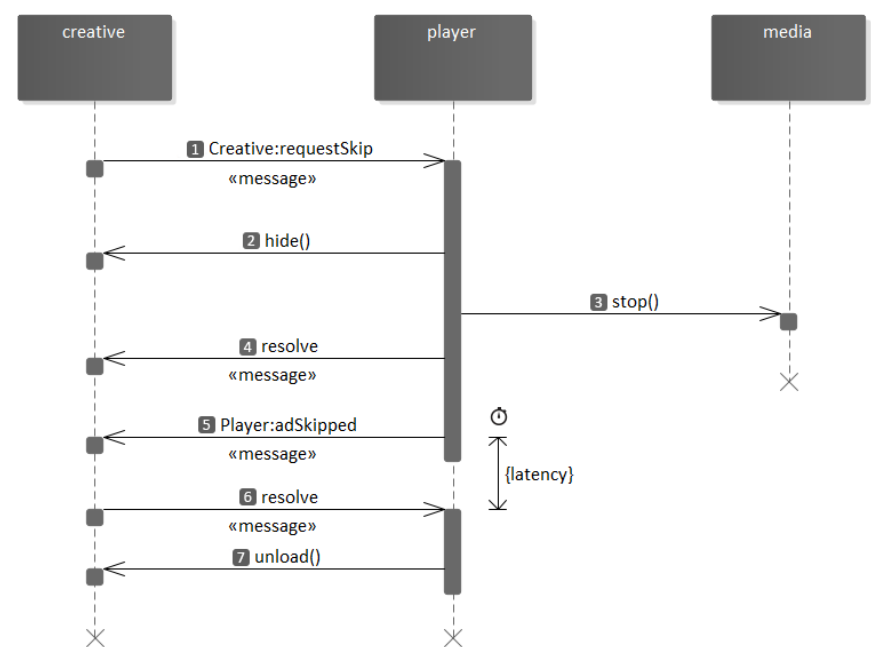
The player posts a SIMID:Player:adSkipped message immediately after the user ends ad experience. For example, by clicking on the player-owned Skip Ad button. The player must stop the media and hide the creative iframe before sending the Player:adSkipped message.

The player waits for the resolve creative response. The player may time out if the creative takes too long to respond and unload the iframe. The timeout should be reasonable to allow creative to conclude ad-end logic.

官方未给该消息定义 args 参数。

响应 · resolve §4.3.1.1

The creative must respond to Player:adSkipped with resolve once its internal ad-end processes finalize. When the player receives resolve, it unloads the creative iframe.

SIMID:Player:adStopped

§4.3.2resolve

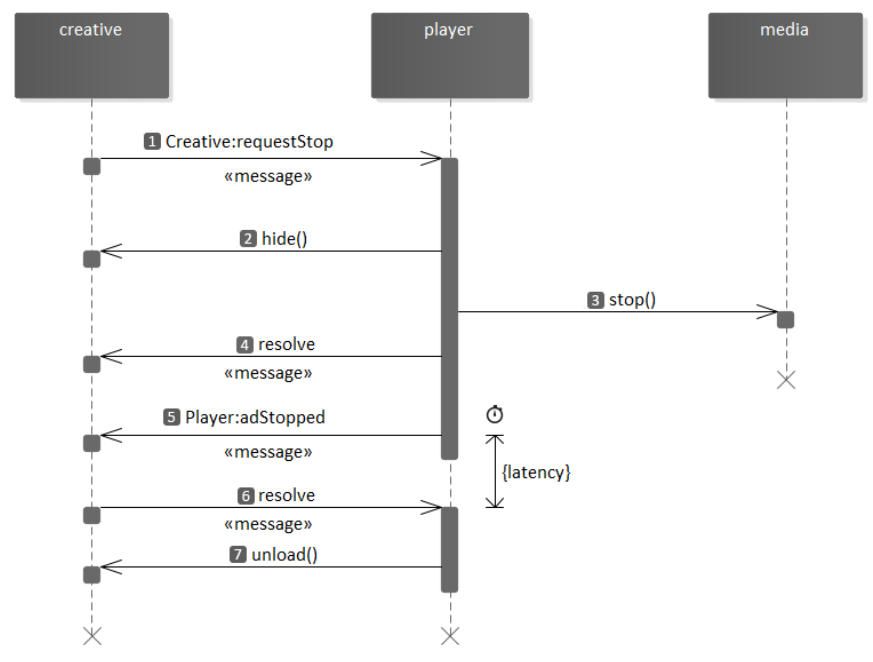
The player posts a SIMID:Player:adStopped message immediately after it terminates the ad for any reason other than a user generated skip. See § 4.3.1 SIMID:Player:adSkipped.

The player must stop media playback and hide the creative iframe before reporting Player:adStopped. The player must wait for a resolve response from the creative allotting a reasonable timeout to accommodate creative’s needs to finalize the ad-end logic.

dictionary MessageArgs {
required unsigned short code;
};

code,

Ad stop cause code. Values:

0 Unspecified 1 User-initiated close 2 Auto-close due to media playback completion 3 Player-initiated close before media playback completion 4 Creative-initiated close 5 Nonlinear duration complete.

参数结构WebIDL dictionary · MessageArgs

参数类型必选取值
codeunsigned short✓

响应 · resolve §4.3.2.1

The creative must respond to Player:adStopped with resolve once its internal ad-end processes finalize. When the player receives resolve, it unloads the creative iframe.

SIMID:Player:appBackgrounded

§4.3.3resolve

Within mobile in-app ads, when the app moves to the background, the player posts a SIMID:Player:appBackgrounded message.

官方未给该消息定义 args 参数。

响应 · resolve §4.3.3.1

The creative resonds to appBackgrounded with resolve message.

SIMID:Player:appForegrounded

§4.3.4无需应答

Within mobile in-app ad executions, when the app moves from the background to the foreground, the player posts a SIMID:Player:appForegrounded message.

官方未给该消息定义 args 参数。

SIMID:Player:collapseNonlinear

§4.3.5无需应答

The player may resize the ad to its default dimensions without the creative requesting a collapse. The player may collapse the ad based on its internal logic or in response to the user resuming media playback.

The player posts the § 4.3.5 SIMID:Player:collapseNonlinear message before it resizes the creative iframe.

The § 4.3.5 SIMID:Player:collapseNonlinear is an information-only message; there are no associated resolution responses.

官方未给该消息定义 args 参数。

SIMID:Player:fatalError

§4.3.6resolve

The player posts a SIMID:Player:fatalError message when it encounters exceptions that disqualify the ad from displaying any longer. If feasible, the player stops the ad media.

Regardless of the player’s ability to terminate playback, the player should hide creative iframe and wait for resolve response before unloading iframe.

See § 6.9.5 Ad Errors Out

dictionary MessageArgs {
required unsigned short errorCode;
DOMString errorMessage;
};

errorCode

See § 9 Error Codes.

errorMessage,

Additional information

参数结构WebIDL dictionary · MessageArgs

参数类型必选取值
errorCodeunsigned short✓
errorMessageDOMString

响应 · resolve §4.3.6.1

The creative must respond to Player:fatalError with resolve. After resolve arrives, the player should remove the iframe.

See § 6.9.5 Ad Errors Out

SIMID:Player:init

§4.3.7resolvereject

The purpose of the SIMID:player:init message is to transport data to assist with the interactive component initialization. See § 6.2 Typical Initialization WorkFlow and § 6.4 Uninterrupted Initialization WorkFlow.

The creative must respond to Player:init with either § 4.3.7.1 resolve or § 4.3.7.2 reject.

dictionary MessageArgs {
required EnvironmentData environmentData;
required CreativeData creativeData;
};

environmentData,

Information about publisher’s environment and media player capacities.

creativeData,

Information that pertains to the specific creative.

dictionary CreativeData {
required DOMString adParameters;
DOMString clickThruUrl;
};

adParameters,

Typically, the value of VAST node.

clickThruUrl,

Value of VAST node.

dictionary EnvironmentData {
required Dimensions videoDimensions;
required Dimensions creativeDimensions;
required boolean fullscreen;
required boolean fullscreenAllowed;
required boolean variableDurationAllowed;
required SkippableState skippableState;
DOMString skipoffset;
required DOMString version;
DOMString siteUrl;
DOMString appId;
DOMString useragent;
DOMString deviceId;
boolean muted;
float volume;
NavigationSupport navigationSupport;
CloseButtonSupport closeButtonSupport;
float nonlinearDuration;
};
dictionary Dimensions {
required long x;
required long y;
required long width;
required long height;
};
enum SkippableState {"playerHandles", "adHandles", "notSkippable"};
enum NavigationSupport {"adHandles", "playerHandles", "notSupported"};
enum CloseButtonSupport {"adHandles", "playerHandles"};

videoDimensions,

Communicates media element coordinates and size. -1 indicates an unknown value.

creativeDimensions,

Communicates creative iframe coordinates and size the player will set when iframe becomes visible. The value of -1 indicates an unknown value, such as when responsive dimensions are dependent on the environment.

fullscreen,

The value true indicates that the player is currently in fullscreen mode. fullscreenAllowed,

Communicates the player’s capacity to toggle screen modes.

  1. The value true indicates that creative may request screen mode change.
  2. The value false denotes that the player will reject calls to change screen mode.*

variableDurationAllowed,

Communicates player’s capacities† to:

a. interrupt ad playback progress – the ability to pause the media;

b. extend ad user experience length beyond ad media duration after ad playback completion;

c. accommodate creative’s ad stop request.

The value true asserts that the player can:

  1. pause media playback in response to creative’s requests;
  2. extend ad experience after media playback completion (and abstaining from ad unloading) if the creative posts ad duration change instructions;
  3. accommodate creative’s ad stop request.‡

skippableState,

Expresses:

a. player’s ability to skip the ad;†

b. VAST skippability-associated instructions logic management;

c. Skip Ad button handling delegation.

The value playerHandles indicates that all of the following applies:

  1. the publisher controls skippability logic (including handling of VAST skipoffset directives);
  2. either VAST contains skipoffset or the skippability is the publisher-administered behavior;
  3. the player implements the Skip Ad button;
  4. the player will ignore skip requests from the creative.

The value adHandles signals that the player:

  1. can skip the ad;
  2. does not implement internal Skip Ad button;
  3. disregards VAST skippability directives;
  4. will skip the ad in response to § 4.4.16 SIMID:Creative:requestSkip message.§

The value notSkippable declares that the player:

  1. cannot skip the ad;
  2. ignores VAST skippability instructions;
  3. will disregard skip request from the creative.

With both playerHandles and notSkippable, the creative avoids the Skip Ad button drawing.

skipoffset,

Optional parameter that communicates the time the ad becomes skippable for the current session.

The skipoffset value format is "HH:MM:SS" or "HH:MM:SS.mmm".

The value can differ from the skipoffset in the VAST response when the player controls skippability. If the parameter’s skippableState value is "adHandles", the creative must display the Skip Ad button when media playback arrives at the time specified by the skipoffset parameter.

version,

The SIMID version the player implements.

muted,

true if the player § is muted.◊

volume, player’s § volume – expressed as a number between 0 and 1.0.

siteUrl,

The URI of the publisher’s site. May be full or partial URL.

appId,

The ID of the mobile app, if applicable.

useragent,

The information about SDKs as well as the player’s vendor and version. The value should comply with VAST-specified conventions.

deviceId,

IDFA or AAID

NavigationSupport,

Indicates how clickthroughs should be handled.

  1. playerHandles Indicates that because of the platform, the player should handle clickthrough via § 4.4.12 SIMID:Creative:requestNavigation. Mobile platforms are often this way.
  2. adHandles Indicates that the creative should open tabs or windows in response to user clicks. Web platforms are often this way.
  3. notSupported The platform does not support clickthrough.

CloseButtonSupport,

Indicates what should render a close button for nonlinear ads.

  1. playerHandles Indicates the player will render a close button for nonlinear ads.
  2. adHandles Indicates that the creative may render a close button. If the player will not render a close button it should always use adHandles for this parameter.

nonlinearDuration,

The duration in seconds that a nonlinear ad will play for. Often, this might be the same as minSuggestedDuration from the VAST response or the duration of the content.

  1. see § 4.4.10 SIMID:Creative:requestFullscreen and § 4.4.11 SIMID:Creative:requestExitFullscreen messages.

In SSAI, live broadcast, and other time-constrained environments, the player must support uninterrupted media (both content and ads) playback progress. Specifically, the player may not be able to pause the media, shorten ad, or extend user ad experience. see § 4.4.13 SIMID:Creative:requestPause, § 4.4.14 SIMID:Creative:requestPlay, § 4.4.8 SIMID:Creative:requestChangeAdDuration, and § 4.4.17 SIMID:Creative:requestStop.

SIMID does not expect device audio state information.

Values of muted and volume are independent. While the player is muted, volume can be greater than zero; the volume zero does not mean the player is muted.
参数结构WebIDL dictionary · MessageArgs

参数类型必选取值
environmentDataEnvironmentData✓
videoDimensionsDimensions✓
xlong✓
ylong✓
widthlong✓
heightlong✓
creativeDimensionsDimensions✓
xlong✓
ylong✓
widthlong✓
heightlong✓
fullscreenboolean✓
fullscreenAllowedboolean✓
variableDurationAllowedboolean✓
skippableStateSkippableState✓playerHandles / adHandles / notSkippable
skipoffsetDOMString
versionDOMString✓
siteUrlDOMString
appIdDOMString
useragentDOMString
deviceIdDOMString
mutedboolean
volumefloat
navigationSupportNavigationSupportadHandles / playerHandles / notSupported
closeButtonSupportCloseButtonSupportadHandles / playerHandles
nonlinearDurationfloat
creativeDataCreativeData✓
adParametersDOMString✓
clickThruUrlDOMString

响应 · resolve §4.3.7.1

The creative acknowledges the initialization parameters.

If the creative delays calling resolve, see § 6.5 Creative Delays Resolving Init.

响应 · reject §4.3.7.2

The creative may respond with a reject based on its internal logic.

dictionary MessageArgs {
required unsigned short errorCode;
DOMString reason;
};

errorCode,

See § 9 Error Codes.

reason,

Optional information about rejection cause.

The player then will follow the rejection workflow. See § 6.6 Creative Rejects Init.

参数类型必选取值
errorCodeunsigned short✓
reasonDOMString

SIMID:Player:log

§4.3.8无需应答

The purpose of the Player:log message is to convey optional, primarily debugging, information to the creative.

Note: In SIMID prefixing log messages with “WARNING:” has a specific meaning. The player is communicating performance inefficiencies or specification deviations aimed at creative developers. For example, if the creative sends the requestChangeVolume message but does not use the correct parameters, a “WARNING:” message is appropriate.

dictionary MessageArgs {
required DOMString message;
};

message,

Logging information.

参数结构WebIDL dictionary · MessageArgs

参数类型必选取值
messageDOMString✓

SIMID:Player:resize

§4.3.9无需应答

When the player changes any of ad components’ size, it posts the SIMID:Player:resize message. The message describes the media and creative sizes, independently, even if the dimensions are identical.

dictionary MessageArgs {
required Dimensions videoDimensions;
required Dimensions creativeDimensions;
required boolean fullscreen;
};
dictionary Dimensions {
required long x;
required long y;
required long width;
required long height;
};

mediaDimensions,

Media element size and coordinates.

creativeDimensions,

SIMID iframe size and coordinates.*

fullscreen,

Value is true when the ad is in fullscreen mode.

If the iframe is invisible at the time the player posts resize message, the parameter creativeDimensions communicates forthcoming values: iframe’s size, and coordinates once it is displayed.

参数结构WebIDL dictionary · MessageArgs

参数类型必选取值
videoDimensionsDimensions✓
xlong✓
ylong✓
widthlong✓
heightlong✓
creativeDimensionsDimensions✓
xlong✓
ylong✓
widthlong✓
heightlong✓
fullscreenboolean✓

SIMID:Player:startCreative

§4.3.10resolvereject

See § 6.3 Typical Start Creative WorkFlow

The player posts SIMID:Player:startCreative message when it is ready to make the iframe visible. The player must transmit Player:startCreative as close to the first media frame rendering as possible. The player waits for a § 4.3.10.1 resolve response to display the SIMID iframe. The interactive creative should be ready to reply to Player:startCreative immediately.

§ 4.3.7 SIMID:Player:init section describes the flow that precedes the instant the player emits a Player:startCreative message.

官方未给该消息定义 args 参数。

响应 · resolve §4.3.10.1

By posting resolve, the interactive creative acknowledges that it is ready for display. The creative should be ready to respond immediately. The player makes the iframe visible upon a resolve receipt

Refer to § 6.3 Typical Start Creative WorkFlow 2.

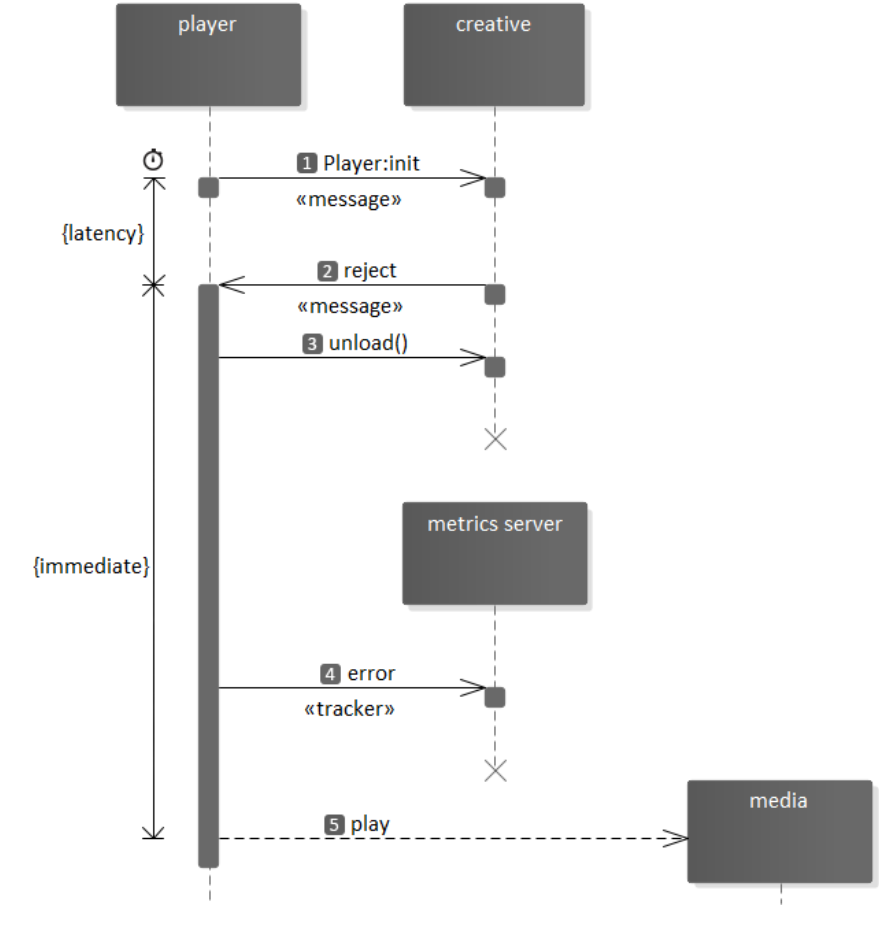
If the creative fails to reply with a resolve by the time ad media playback completes, the player reports VAST error tracker with the errorCode 1213. See § 9 Error Codes.

响应 · reject §4.3.10.2

When the creative responds with a reject, the player may unload the iframe. The player reports VAST error tracker with the errorCode the creative supplied.

dictionary MessageArgs {
required unsigned short errorCode;
DOMString reason;
};

errorCode,

See § 9 Error Codes.

reason,

Additional information.

参数类型必选取值
errorCodeunsigned short✓
reasonDOMString

SIMID:Creative · 创意发给播放器

The creative posts messages to the player to requests the ad’s state changes, obtain data, and to send notifications. The creative prefixes its messages with the namespace SIMID:Creative.

SIMID:Creative messages may require the player to accept and process arguments. With some messages, the creative expects the player to respond with resolutions.

Note: In SIMID, the creative initializes the session and posts the first message, createSession. See § 8.4 Session Layer.

SIMID:Creative messages summary.

Message typears parametersResponses
§ 4.4.1 SIMID:Creative:clickThrux yn/a
§ 4.4.4 SIMID:Creative:fatalErrorerrorCode errorMessagen/a
§ 4.4.5 SIMID:Creative:getMediaStaten/a§ 4.4.5.1 resolve
§ 4.4.6 SIMID:Creative:logmessagen/a
§ 4.4.7 SIMID:Creative:reportTrackingtrackingUrls§ 4.4.7.1 resolve § 4.4.7.2 reject
§ 4.4.8 SIMID:Creative:requestChangeAdDurationduration§ 4.4.8.1 resolve § 4.4.8.2 reject
§ 4.4.9 SIMID:Creative:requestChangeVolumevolume muted§ 4.4.9.1 resolve § 4.4.9.2 reject
§ 4.4.11 SIMID:Creative:requestExitFullscreenn/a§ 4.4.11.1 resolve § 4.4.11.2 reject
§ 4.4.10 SIMID:Creative:requestFullscreenn/a§ 4.4.10.1 resolve § 4.4.10.2 reject
§ 4.4.13 SIMID:Creative:requestPausen/a§ 4.4.13.1 resolve § 4.4.13.2 reject
§ 4.4.14 SIMID:Creative:requestPlayn/a§ 4.4.14.1 resolve § 4.4.14.2 reject
§ 4.4.15 SIMID:Creative:requestResizen/a§ 4.4.15.1 resolve § 4.4.15.2 reject
§ 4.4.16 SIMID:Creative:requestSkipn/a§ 4.4.16.1 resolve § 4.4.16.2 reject
§ 4.4.17 SIMID:Creative:requestStopn/a§ 4.4.17.1 resolve § 4.4.17.2 reject
Message typears parametersResponses
§ 4.4.1 SIMID:Creative:clickThrux yn/a
§ 4.4.4 SIMID:Creative:fatalErrorerrorCode errorMessagen/a
§ 4.4.5 SIMID:Creative:getMediaStaten/a§ 4.4.5.1 resolve
§ 4.4.6 SIMID:Creative:logmessagen/a
§ 4.4.7 SIMID:Creative:reportTrackingtrackingUrls§ 4.4.7.1 resolve § 4.4.7.2 reject
§ 4.4.8 SIMID:Creative:requestChangeAdDurationduration§ 4.4.8.1 resolve § 4.4.8.2 reject
§ 4.4.9 SIMID:Creative:requestChangeVolumevolume muted§ 4.4.9.1 resolve § 4.4.9.2 reject
§ 4.4.11 SIMID:Creative:requestExitFullscreenn/a§ 4.4.11.1 resolve § 4.4.11.2 reject
§ 4.4.10 SIMID:Creative:requestFullscreenn/a§ 4.4.10.1 resolve § 4.4.10.2 reject
§ 4.4.13 SIMID:Creative:requestPausen/a§ 4.4.13.1 resolve § 4.4.13.2 reject
§ 4.4.14 SIMID:Creative:requestPlayn/a§ 4.4.14.1 resolve § 4.4.14.2 reject
§ 4.4.15 SIMID:Creative:requestResizen/a§ 4.4.15.1 resolve § 4.4.15.2 reject
§ 4.4.16 SIMID:Creative:requestSkipn/a§ 4.4.16.1 resolve § 4.4.16.2 reject
§ 4.4.17 SIMID:Creative:requestStopn/a§ 4.4.17.1 resolve § 4.4.17.2 reject

SIMID:Creative:clickThru

§4.4.1resolvereject

The SIMID:Creative:clickThru message notifies the player of a clickthrough for event tracking. SIMID delegates clickthrough execution to the creative, including redirecting the user to the landing page. The interactive component posts clickThru only when the creative classifies a user interaction as a clickthrough.

The interactive component posts the Creative:clickThru message only when the creative classifies a user interaction as a clickthrough. To open the landing page in the situations when user interaction does not constitute clickthrough, the creative must utilize § 4.4.12 SIMID:Creative:requestNavigation message.

Note: Not all clickthrough metrics require the opening of a landing page. The player must assume that a clickThru message that does not provide a landing page URL is still a valid clickthrough notification, such as in the case of “deep links” or links to the app store in a device.

Deep Links

Deep links navigate the user to an app or the app store in a device. The URL for navigating to an app generally contains query parameters that can take a user to a specific view in the app and may involve a process for getting setup before a deep link will be allowed or recognized. For example in iOS, advertisers must register a SKAdNetwork ID for their deep links. SIMID can support launching a deep link, but ad developers must include the relevant details depending on environment in order for the device OS to execute the link.

The message, clickThru, is not an explicit media-pausing directive to the player. If the environment permits, the player must pause ad media in all cases when the user navigates away from the player-hosting page or app, including clickthrough. See Page Visibility API.

dictionary MessageArgs {
short x;
short y;
boolean playerHandles;
DOMString url;
};

x,

The click left offset in the creative’s coordinate system.

y,

The click top offset in the creative’s coordinate system.

playerHandles,

When true - creative requests the player to open the landing page. The creative must not require the player to open the external page if the § 4.3.7 SIMID:Player:init message argument navigationSupport value is not playerHandles.

url,

Landing page address. In the cases when the creative handles landing page redirect internally, it may not provide url value. In such scenarios, the creative sets playerHandles value to false.

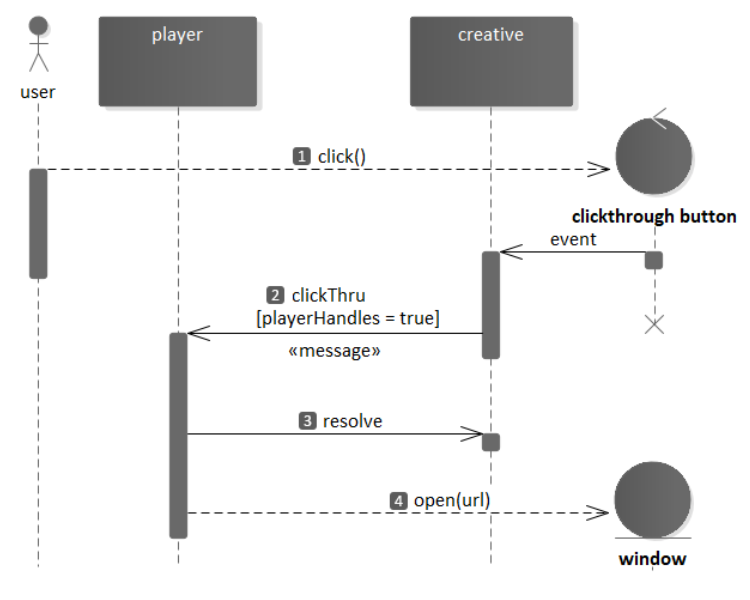
*Creative:clickThru Handling*

  1. User clicks on clickthrough button.
  2. Creative sets playerHandles = true and posts § 4.4.1 SIMID:Creative:clickThru message.
  3. Player posts § 4.4.1.1 resolve message before redirecting user to the landing page.
  4. Player opens the landing page window.

参数结构WebIDL dictionary · MessageArgs

参数类型必选取值
xshort
yshort
playerHandlesboolean
urlDOMString

响应 · resolve §4.4.1.1

In the scenarios when the player handles landing page redirects, it responds with resolve before the landing page opens.

响应 · reject §4.4.1.2

The player posts reject if the creative requested the player to handle navigation when the player does not implement user redirects, creative fails to provide url, or the url is invalid. The player provides the errorCode 1214.

dictionary MessageArgs{
required short errorCode;
DOMString reason;
};

errorCode,

reason,

Additional information. For example: "Invalid URL".

参数类型必选取值
errorCodeshort✓
reasonDOMString

SIMID:Creative:collapseNonlinear

§4.4.2resolve

When the creative is ready to collapse, it posts a Creative:collapseNonlinear message. In response to collapseNonlinear, the player resizes the ad to its original state and resumes the content media playback.

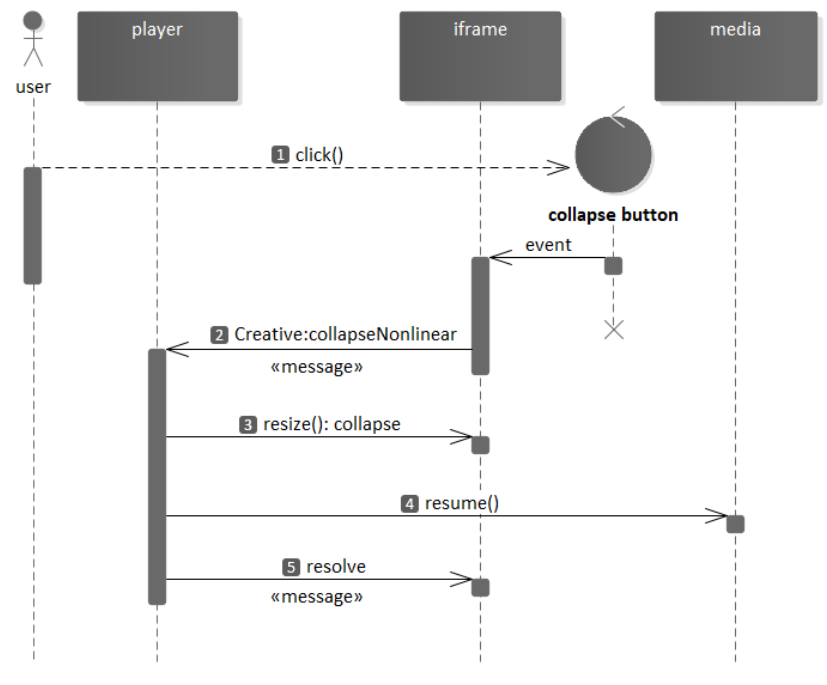
*Creative:collapseNonlinear Handling*

  1. User clicks on collapse button.
  2. Creative posts § 4.4.2 SIMID:Creative:collapseNonlinear message.
  3. Player resizes the creative to its original (default) dimensions.
  4. Player resumes media playback.
  5. Player posts § 4.4.2.1 resolve message.

官方未给该消息定义 args 参数。

响应 · resolve §4.4.2.1

When the player resizes the ad, it posts a resolve message.

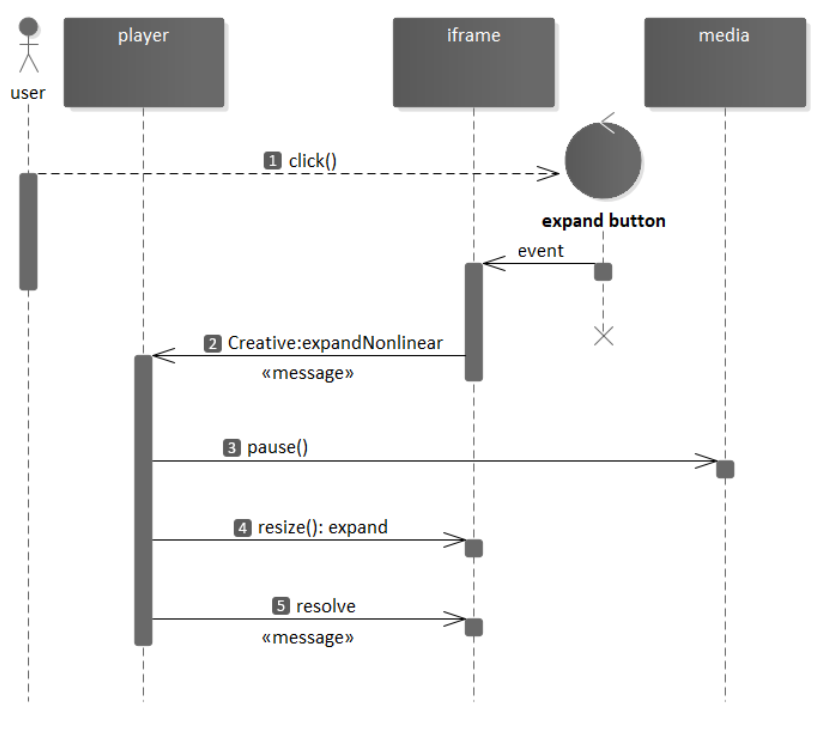
SIMID:Creative:expandNonlinear

§4.4.3resolvereject

The creative posts Creative:expandNonlinear when a user wants to expand the ad (by clicking expand control/button that the default creative provides). Auto-expand is strongly discouraged and goes against industry guidelines.

Under normal circumstances, the player pauses the media. In cases when the content is video, the player resizes the creative iframe to the dimensions of the video and places the expanded creative at video zero coordinates.

If the player communicates to the creative that it has no capacity to expand the ad with § 4.3.7 SIMID:Player:initmessage, the creative does not provide an expand button or post the Creaitve:expandNonlinear message.

*Creative:expandNonlinear Handling*

  1. User clicks on expand button.
  2. Creative posts § 4.4.3 SIMID:Creative:expandNonlinear message.
  3. Player pauses media.
  4. Player resizes the creative to its expanded dimensions.
  5. Player posts § 4.4.3.1 resolve message.

官方未给该消息定义 args 参数。

响应 · resolve §4.4.3.1

Once the player resizes the ad, it posts a resolve message. The player provides the expanded size dimensions and position with the resolve message.args

dictionary MessageArgs {
required Dimensions creativeDimensions;
};
dictionary Dimensions {
required long x;
required long y;
required long width;
required long height;
};

creativeDimensions,

SIMID iframe size and coordinates.

参数类型必选取值
creativeDimensionsDimensions✓
xlong✓
ylong✓
widthlong✓
heightlong✓

响应 · reject §4.4.3.2

If the player declines the expansion request, it posts a reject message.

SIMID:Creative:fatalError

§4.4.4无需应答

The creative posts SIMID:Creative:fatalError in cases when its internal exceptions prevent the interactive component from further execution. In response to the Creative:fatalError message, the player unloads the SIMID iframe and reports VAST error tracker with the errorCode specified by the creative. The ad media playback must stop, if possible.

dictionary MessageArgs{ required unsigned short errorCode;
DOMString errorMessage;
};

errorCode,

See § 9 Error Codes.

errorMessage,

Additional information.

参数结构WebIDL dictionary · MessageArgs

参数类型必选取值
errorCodeunsigned short✓
errorMessageDOMString

SIMID:Creative:getMediaState

§4.4.5resolve

The creative posts a SIMID:Creative:getMediaState message to request the current ad media states values.

官方未给该消息定义 args 参数。

响应 · resolve §4.4.5.1

The player should always respond to Creative:getMediaState with a resolve, including situations when the player is unable to provide all expected values.

dictionary MessageArgs{
DOMString currentSrc;
float currentTime;
float duration;
boolean ended;
boolean muted;
boolean paused;
float volume;
boolean fullscreen;
};

currentSrc,

The URI to the media publisher chooses for the playback. This value is optional and may not be provided in the case of server side ad insertion.

currentTime,

The time elapsed since the first ad media frame.

duration,

Ad media duration.

ended,

In HTML, the value of HTMLMediaElement.ended attribute.

muted,

In HTML, the value of HTMLMediaElement.muted attribute.

paused,

In HTML, the value of HTMLMediaElement.paused attribute.

volume,

In HTML, the value of HTMLMediaElement.volume attribute.

fullscreen,

The value is true if the media element is in full screen..

参数类型必选取值
currentSrcDOMString
currentTimefloat
durationfloat
endedboolean
mutedboolean
pausedboolean
volumefloat
fullscreenboolean

SIMID:Creative:log

§4.4.6无需应答

The message SIMID:Creative:log enables the creative to communicate arbitrary information to the player.

Note: If the log message purpose is to notify the player about the player’s non-standard behavior, the creative prepends Message.args.message value with “WARNING:” string.

Warning messages are used to inform player developers about occurances of non-fatal issues.

dictionary MessageArgs {
required DOMString message;
};

message,

Logging information.

参数结构WebIDL dictionary · MessageArgs

参数类型必选取值
messageDOMString✓

SIMID:Creative:reportTracking

§4.4.7resolvereject

The SIMID:Creative:reportTracking message enables a creative to delegate arbitrary metrics reporting to the player.

The creative may inject macros into trackers URIs.

In response to the reportTracking message, the player must:

  1. Send the trackers specified by the message as soon as possible.
  2. Replace VAST-supported macros with the corresponding values.
  3. Accept and send the trackers with custom macros – leave non-standard macros intact unless the publisher-ad integration involves custom macros processing.
dictionary MessageArgs {
required Array trackingUrls;
};

trackingUrls,

Array of URIs.

参数结构WebIDL dictionary · MessageArgs

参数类型必选取值
trackingUrlsArray✓

响应 · resolve §4.4.7.1

The player posts a resolve after it sends the trackers.

响应 · reject §4.4.7.2

The player posts a reject if it did not send the trackers.

dictionary MessageArgs {
required unsigned short errorCode;
DOMString reason;
};

errorCode,

See § 9 Error Codes.

reason,

Additional information.

参数类型必选取值
errorCodeunsigned short✓
reasonDOMString

SIMID:Creative:requestChangeAdDuration

§4.4.8resolvereject

In response to user interaction, the creative is requesting a new ad duration. User interaction is required for a change ad duration request. Ad duration cannot be extended as part of an automated process in the ad, such as adding an end card. Time for the end card must be allotted within the original duration of the ad.

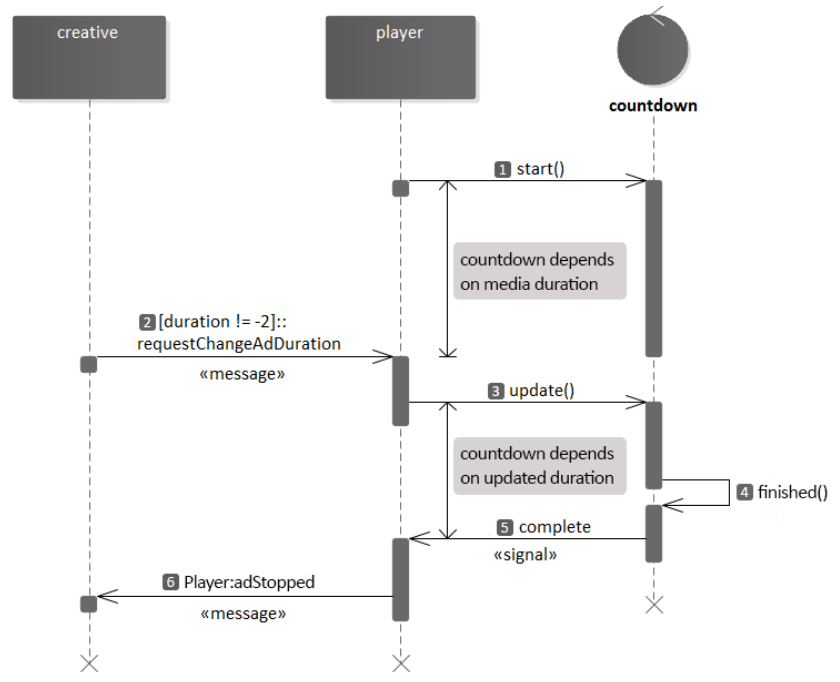
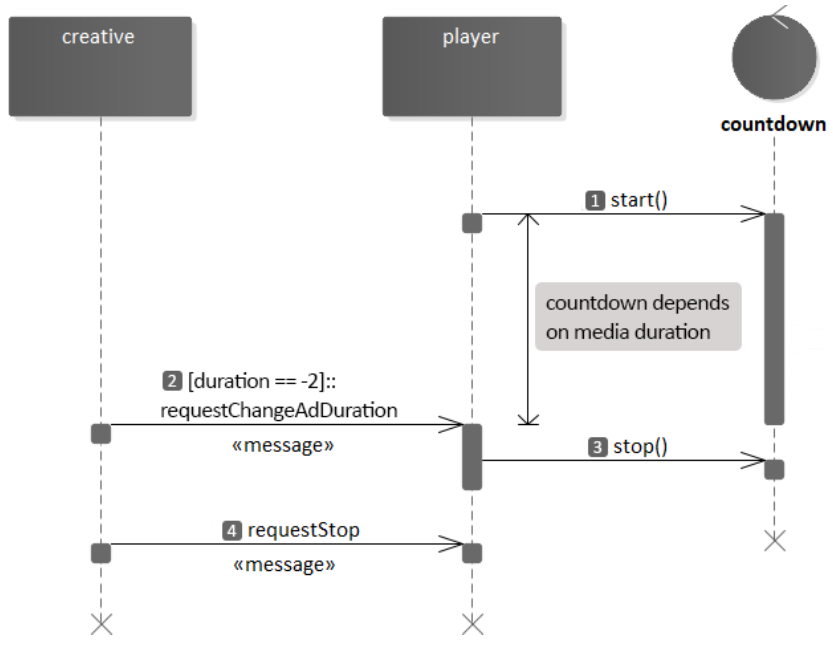
In SIMID, ad’s media determines the initial ad duration. The ad span may change due to user interaction. When ad duration changes, the creative posts Creative:requestChangeAdDuration message that communicates an updated value. In response to the requestChangeAdDuration message, the player adjusts ad-end timing and updates its ad progress UI (eg., countdown).

The creative expresses a known duration value in seconds. In cases where the duration is unknown (typically due to user interaction), the value is -2. With a known duration, the player unloads the ad automatically once the countdown (ad remaining time) reaches zero. See § 6.10.1 Ad Extends Beyond Media Completion 456).

When the duration value is -2, the player displays the ad indefinitely until the creative posts § 4.4.17 SIMID:Creative:requestStop. See § 6.10.3 Ad Duration Changed Workflow - Unknown Time step 4).

Note: The player communicates its capacities to modify the ad duration with § 4.3.7 SIMID:Player:initmessage args parameter variableDurationAllowed. If the value of variableDurationAllowed is false, the creative refrains from posting requestChangeAdDuration message.

dictionary MessageArgs {
required float duration;
};

duration,

Value in seconds for a known duration.

The value -2 indicates an unknown duration.

See § 6.10 Ad Duration Changed Workflow.

参数结构WebIDL dictionary · MessageArgs

参数类型必选取值
durationfloat✓

响应 · resolve §4.4.8.1

By posting resolve response to requestChangeAdDuration message, the player signals that it will respect requested duration by modifying the ad duration-dependent behaviors.

Note: The player must accommodate an ad duration change directive if the value of the § 4.3.7 SIMID:Player:init message parameter variableDurationAllowed is true.

响应 · reject §4.4.8.2

By posting reject response to requestChangeAdDuration message, the player states that:

  1. It ignored the duration change request;
  2. Ad media playback continues uninterrupted;
  3. The player will stop and unload the ad once any of the prescribed player-side ad-end triggers arise.

Note: The single SIMID-supported reason for a reject in response to requestChangeAdDuration is the player’s inability to alter media progress.

SIMID:Creative:requestChangeVolume

§4.4.9resolvereject

The creative requests ad volume change by posting a SIMID:Creative:requestChangeVolume message.

dictionary MessageArgs {
required float volume;
required boolean muted;
};

volume,

The number between 0 and 1.*

muted,

true if media audio should be muted.*

  1. Properties volume and muted describe two independent audio states. While media is muted, its volume may be greater than zero; at the same time with zero volume, media may be unmuted.

参数结构WebIDL dictionary · MessageArgs

参数类型必选取值
volumefloat✓
mutedboolean✓

响应 · resolve §4.4.9.1

By posting resolve message, the player signals it has changed the media audio states to the requested values.

响应 · reject §4.4.9.2

By posting reject message, the player signals that it did not change the audio state.

SIMID:Creative:requestFullscreen

§4.4.10resolvereject

The creative requests the player to transition the ad into fullscreen mode by posting a SIMID:Creative:requestFullscreen message.

Note: the player communicates its capacity to toggle screen modes with § 4.3.7 SIMID:Player:init message parameter fullscreenAllowed. When the value of fullscreenAllowed is false, the creative refrains from posting Creative:requestFullscreen message.

官方未给该消息定义 args 参数。

响应 · resolve §4.4.10.1

By posting resolve response to requestFullscreen message, the player signals that it moved both the media element and the SIMID iframe into fullscreen mode.

响应 · reject §4.4.10.2

By posting reject response to requestFullscreen message, the player signals that it did not change the screen mode because it is either:

  1. Incapable of toggling between screen modes.
  2. Already in the fullscreen mode.
  3. Disallows fullscreen mode.

SIMID:Creative:requestExitFullscreen

§4.4.11resolvereject

The creative requests the player to transition the ad into normal-screen mode by posting a SIMID:Creative:requestExitFullscreen message.

Note: the player communicates its capacity to toggle screen modes with § 4.3.7 SIMID:Player:init message parameter fullscreenAllowed. When the value of fullscreenAllowed is false, the creative refrains from posting Creative:requestExitFullscreen message.

官方未给该消息定义 args 参数。

响应 · resolve §4.4.11.1

By posting resolve response to requestExitFullscreen message, the player signals that it moved both the media element and the SIMID iframe into normal-screen mode.

响应 · reject §4.4.11.2

The player responds to requestExitFullscreen message with a reject when it did not change the screen mode because it is either: ● Incapable of toggling between screen modes or ● Already in the normal-screen mode.

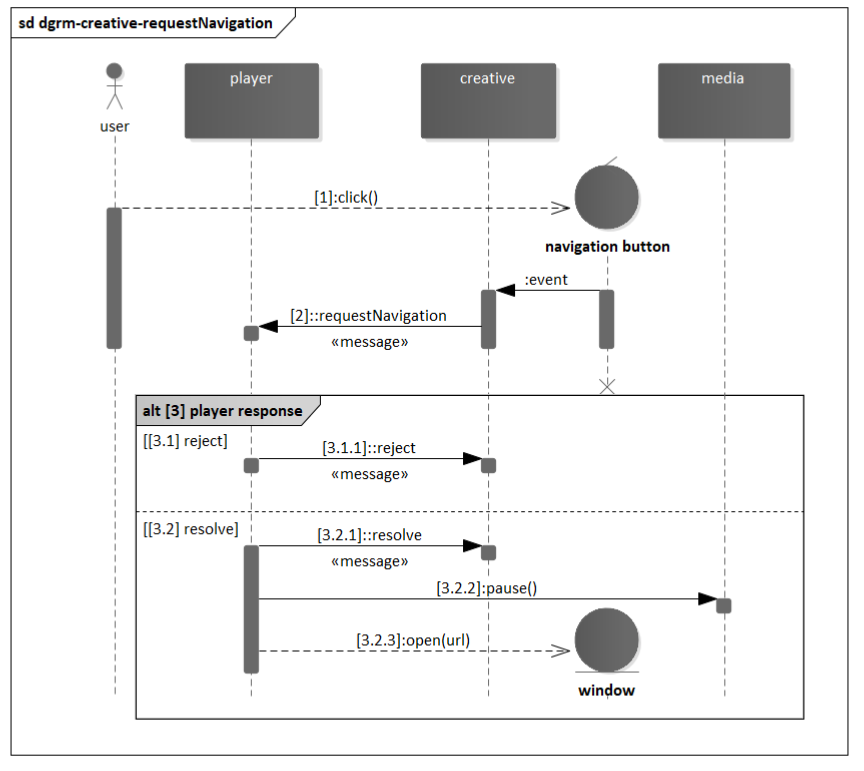
SIMID:Creative:requestNavigation

§4.4.12resolvereject

In environments like mobile apps, the player manages redirections of the user to external landing pages. In response to § 4.4.12 SIMID:Creative:requestNavigation, the player opens a browser window with the location the creative provides with the message.args.uri parameter.

In web environments, the creative manages navigation.

The creative sends § 4.4.12 SIMID:Creative:requestNavigation in response to the user’s interaction. The creative does not request navigation without user interaction.

dictionary MessageArgs {
required string uri;
};

uri,

The address of the landing page.

*Creative:requestNavigation Handling*

  1. User clicks on navigation button.
  2. Creative posts requestNavigation message.
  3. Player responds to § 4.4.12 SIMID:Creative:requestNavigation.
  4. Player responds with § 4.4.12.2 reject message if it cannot redirect the user.
  5. Player responds with § 4.4.12.1 resolve message before opening the landing page.
  6. Player pauses media.
  7. Player opens the landing page.

参数结构WebIDL dictionary · MessageArgs

参数类型必选取值
uristring✓

响应 · resolve §4.4.12.1

The player posts resolve before it opens the window to assure the creative receives the message prior to app backgrounding.

响应 · reject §4.4.12.2

The player did not navigate to a new window.

SIMID:Creative:requestPause

§4.4.13resolvereject

The creative requests the player to pause media playback by posting a SIMID:Creative:requestPause message.

Note: the player communicates its capacity to interrupt media playback with § 4.3.7 SIMID:Player:initmessage, parameter variableDurationAllowed. The creative must not post requestPause if the player sets variableDurationAllowed value to false.

官方未给该消息定义 args 参数。

响应 · resolve §4.4.13.1

The player replies to Creative:requestPause with a resolve if it paused the media.

响应 · reject §4.4.13.2

The player replies to Creative:requestPause with a reject if it did not pause the media or the playback is already paused.

SIMID:Creative:requestPlay

§4.4.14resolvereject

The creative requests the player to resume media playback by posting a SIMID:Creative:requestPlay message.

Note: the player communicates its capacity to interrupt media playback with § 4.3.7 SIMID:Player:initmessage, parameter variableDurationAllowed. The creative must not post requestPlay if the player sets variableDurationAllowed value to false.

官方未给该消息定义 args 参数。

响应 · resolve §4.4.14.1

The player replies to Creative:requestPlay with a resolve if it resumed media playback.

响应 · reject §4.4.14.2

The player replies to Creative:requestPlay with a reject if it did not resume the media or the playback is already in progress.

SIMID:Creative:requestResize

§4.4.15resolvereject

The creative requests ad resize by posting a SIMID:Creative:requestResize message.

The player must not resize the ad unless it can change the dimensions of both media element and SIMID iframe to the values specified by the Creative:requestResize message.

Note: the message requestResize must not be used to change screen mode. See the § 4.4.10 SIMID:Creative:requestFullscreen and § 4.4.11 SIMID:Creative:requestExitFullscreen messages.

dictionary MessageArgs {
required Dimensions mediaDimensions;
required Dimensions creativeDimensions;
};
dictionary Dimensions {
required long x;
required long y;
required long width;
required long height;
};

mediaDimensions,

Media element size and coordinates.

creativeDimensions,

SIMID iframe size and coordinates.

参数结构WebIDL dictionary · MessageArgs

参数类型必选取值
mediaDimensionsDimensions✓
xlong✓
ylong✓
widthlong✓
heightlong✓
creativeDimensionsDimensions✓
xlong✓
ylong✓
widthlong✓
heightlong✓

响应 · resolve §4.4.15.1

The player replies to requestResize with a resolve if it has resized the ad and set the dimensions to the values specified by the requestResize message.

响应 · reject §4.4.15.2

The player responds to requestResize with reject when it ignores the message or is unable to complete the resizing.

SIMID:Creative:requestSkip

§4.4.16resolvereject

The creative requests the player skip ad playback if possible.

See § 6.9.2 Creative Skips Ad

官方未给该消息定义 args 参数。

响应 · resolve §4.4.16.1

If the player skips the ad, it responds with a resolve. The player then goes through its skip workflow. See § 4.3.1 SIMID:Player:adSkipped 567

响应 · reject §4.4.16.2

The player replies with a reject if it cannot skip the ad. With the skip rejection: ● The media playback continues.

  1. The iframe remains visible.
  2. The player continues posting SIMID:Media and SIMID:Player messages to the SIMID iframe.
  3. The creative maintains two-way communication with the player; it waits for, and responds to, the player transmitting ad completion related messages.

SIMID:Creative:requestStop

§4.4.17resolvereject

The creative requests the player stop video playback if possible.

See § 6.9.6 Ad Requests Stop

官方未给该消息定义 args 参数。

响应 · resolve §4.4.17.1

If the player can stop the ad, it responds with a resolve (diagram 13, 4). The player then goes through § 6.9.6 Ad Requests Stop workflow (diagram 13, 567).

响应 · reject §4.4.17.2

If the player cannot stop the ad, it responds with a reject. With the requestStop rejection:

  1. The media playback continues - if not previously ended;
  2. The iframe remains visible;
  3. The player continues posting messages to the iframe.

The creative keeps communication with the player open; it waits for, and responds to, the player transmitting ad completion related messages.

消息协议(数据 / 传输 / 会话)

In SIMID, the media player and the creative overlay communicate by exchanging asynchronous signals that maintain a custom messaging protocol. This protocol governs § 8.1 Data Layer, § 8.3 Transport Layer, and § 8.4 Session Layer.

Message 结构

成员类型必选
sessionIdDOMString✓
messageIdunsigned long✓
timestampunsigned long✓
typeDOMString✓
argsany

数据层

8.1Data Layer

SIMID messages transport data. In HTML environments, the data is the message argument of the Window.postMessage() function.

8.1.1Data Structure

The message data implements the following data structure:

dictionary Message {
required DOMString sessionId;
required unsigned long messageId;
required unsigned long timestamp;
required DOMString type;
any args;
};

sessionId,

A string that uniquely identifies the session to which Message belongs. See § 8.4 Session Layer.

messageId,

A message sequence number in the sender’s system. Each participant establishes its own independent sequence counter for the session. The first message messageId value is 0. The sender increments each subsequent messageId value by 1. In practice, this means that the creative and the player messageId values will be different based on the number of sent messages.

timestamp,

A number of milliseconds since January 1, 1970, 00:00:00 UTC (Epoch time). The message sender must set timestamp value as close as possible to the moment the underlying process occurs. However, the receiver should not assume that the timestamp value reflects the exact instant the message-triggering event occurred.

type,

A string that describes the message-underlying event and informs the receiver how to interpret the args parameter.

args,

Additional information associated with the message type.

Example of message data:

{
sessionId: "173378a4-b2e1-11e9-a2a3-2a2ae2dbcce4",
messageId: 10,
timestamp: 1564501643047,
type: "SIMID:Player:adStopped",
args: {
code: 0
}
}

消息类别

8.2Messages Categories

The protocol defines two message classes:

  1. *Primary* messages - the signals triggered by the sender’s internal logic.
  2. *Response* messages - the signals the receiver transmits as acknowledgments of the primary message receipt and processing. There are two response Message types: § 8.2.1 resolve Messages and § 8.2.2 reject Messages.

Both primary and response messages implement the same data structure (see § 8.1.1 Data Structure).

8.2.1resolve Messages

The receiver confirms successful message processing by replying with a resolution message.

Message.type must be resolve.

Message.args must be a ResolveMessageArgs object:

dictionary ResolveMessageArgs {
required unsigned long messageId;
any value;
};

messageId,

The value of the messageId attribute of the message to which the receiver responds.

value,

Additional data associated with this resolve message.

Example of resolve message:

{ sessionId: "173378a4-b2e1-11e9-a2a3-2a2ae2dbcce4",
messageId: 10,
timestamp: 1564501643047,
type: "resolve",
args: {
messageId: 5,
value: {
id: 45
}
}
}

8.2.2reject Messages

When the receiver is unable to process the message, it responds with rejection.

Message.type must be reject.

Message.args.value must be a RejectMessageArgsValue object:

dictionary RejectMessageArgsValue {
unsigned long errorCode;
DOMString message;
};

errorCode,

The error code associated with the reason the receiver rejects the message.

message,

Additional information.

Example of reject message:

{
sessionId: "173378a4-b2e1-11e9-a2a3-2a2ae2dbcce4",
messageId: 10,
timestamp: 1564501643047,
type: "resolve",
args: {
messageId: 5,
value: {
errorCode: 902,
message: "The feature is not available."
}
}
}

传输层

8.3Transport Layer

Transport is a communication mechanism that can send serialized messages between two parties.

8.3.1postMessage Transport

In HTML environments, where the player loads creative overlay in a cross-origin iframe, the parties utilize the standard Window.postMessage() API as the message transport mechanism.

8.3.2Message Serialization

The message sender serializes data into a JSON string. The deserialized JSON must result in a clone of the original Message data object.

In JavaScript, JSON.stringify() performs serialization; JSON.parse() - deserialization.

会话层

8.4Session Layer

The media player may manage several ads that are in different phases of their lifespans; multiple concurrent sessions may be active. For example, while the player is rendering ad-A, it preloads and engages ad-B. Simultaneous two-way communication between the player and both ads persists.

Each session has a unique identifier. All messages that belong to a specific session must reference the same session id. The session id must be cryptographically safe to prevent brute force attacks that would try to guess the session id and spoof as the creative or player.

Note: A robust implementation like window.crypto.getRandomValues or window.crypto.randomUUID is recommended.

8.4.1Establishing a New Session

SIMID delegates the session initialization to the creative overlay. The creative generates a unique session id and posts the first session message with the Message.type createSession. By posting the createSession message, the creative acknowledges its readiness to receive messages from the player.

Note: There is no expectation for the interactive component to be entirely able to participate in ad rendering at the time the creative signals createSession message. Full creative initialization may occur at later stages when the player provides complete data - see § 4.3.7 SIMID:Player:init.

Example of createSession Message data:

{
sessionId: "173378a4-b2e1-11e9-a2a3-2a2ae2dbcce4",
messageId: 0,
timestamp: 1564501643047,
type: "createSession",
args: { }
}

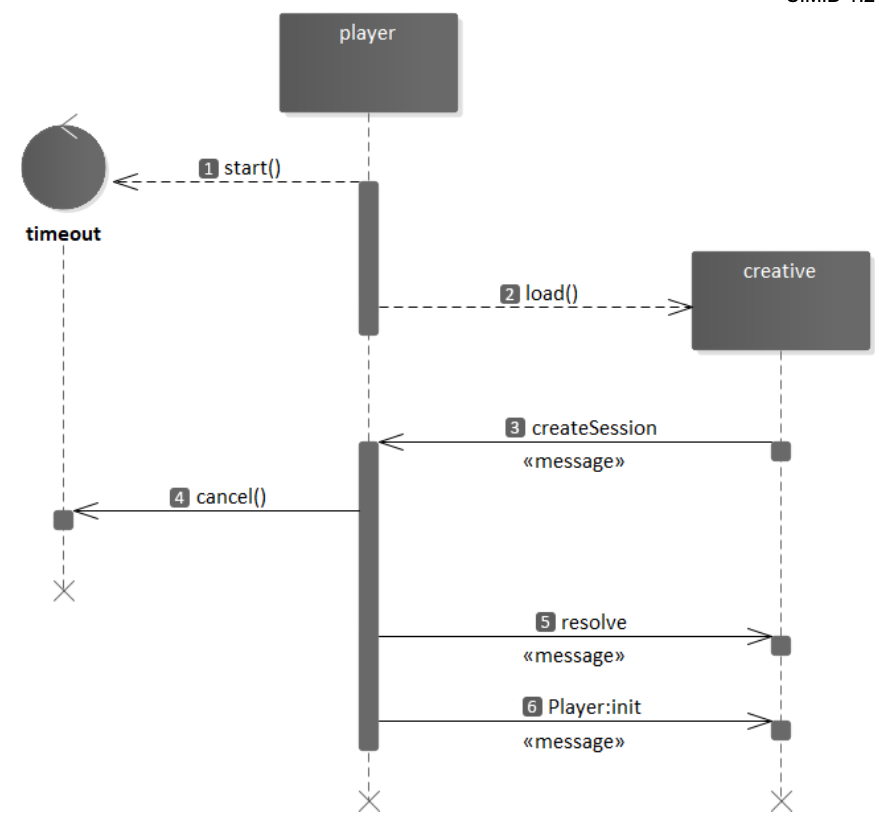
Creative should initialize the session as soon as possible. The player should establish a reasonable timeout for the session initialization message receipt.

The player responds to createSession with a resolve message.

*Typical Session Initialization Sequence*

  1. The player starts a createSession message timeout.
  2. The player loads creative.
  3. Creative posts createSession message.
  4. The player cancels the timeout.
  5. The player responds with a resolve message.
  6. The player initializes creative. See § 4.3.7 SIMID:Player:init.

8.4.2Session Establishing Delays and Failures

Typically, the player should wait for the creative to post a createSession message before proceeding to the simultaneous rendering of both ad media and the interactive component. However, SIMID recognizes scenarios when:

  1. The creative fails to establish a session within the allotted time.
  2. The player’s environment restricts timeout usage (effectively, the timeout is zero). Specifically, SSAI and live broadcasts force zero-timeout use cases.

The creative’s failure to establish a session does not prevent the player from rendering the ad media. If the creative does not post a createSession message on time, the player may proceed with the ad media rendering. However, the player allows the creative to recover in the middle of the ad media playback. The player:

  1. Does not unload the creative.
  2. Does not post messages to the creative.
  3. Maintains the creativeSession message handler.

If the creative has not established a session before the media playback is complete, the player will report a VAST Error tracker with the proper error code. Examples of situations when this may occur are listed below.

Sequence for a failed session initialization

  1. The timeout expires.
  2. The createSession message does not arrive.
  3. The player starts ad media.
  4. The player reports the impression.
  5. The ad media playback completes.
  6. The player reports the VAST error tracker.
  7. The player unloads the creative iframe.

Creative posts a createSession message after the timeout occurs

  1. The timeout expires.
  2. The player retains the interactive component.
  3. The player initiates ad media playback.
  4. The player reports the impression.
  5. The player does not post messages to the creative.
  6. The creative posts createSession message.
  7. The player proceeds with the creative initialization.
  8. Error Codes

The table below is the list of error codes the player and the creative use with reject messages. SIMID allocates the range 1100-1199 to the errors that the creative reports; the range 1200-1299 to the errors the player reports.

枚举类型

枚举取值
SkippableStateplayerHandles / adHandles / notSkippable
NavigationSupportadHandles / playerHandles / notSupported
CloseButtonSupportadHandles / playerHandles

错误码

If the media cannot be played the player should terminate the ad and fire an error using the standard VAST errors.

If either the interactive ad or player wants to terminate with an error the player should fire a 902 error. In cases where this is not possible like live server side ad insertion the player should remove the ad overlay and continue tracking quartiles and completion.

The ad or player should pass a specific error code to indicate why it errored out. The ad can also hand back a string with extra details about the error.

创意侧(1100-1199): 12播放器侧(1200-1299): 24
错误码类型说明
1100Unspecified error.Catchall error if the creative could not find a matching error code. The creative should be more specific in the error message.
1101Resources could not be loaded.The SIMID creative tried to load resources but failed.
1102Playback area not usable by creative.The dimensions the creative needed were not what it received.
1103Wrong SIMID version.The creative could not support the players version.
1104Creative not playable for a technical reason on this site.
1105Request for expand not honored.The creative requested to expand the media player but the player did not allow it.
1106Request for pause not honored.The creative posted § 4.4.13 SIMID:Creative:requestPause but the player did not pause.
1107Play mode not adequate for creative.The creative requires playback control but the player is not giving control. This error should only fire if the VAST for the ad specified that it needs playback control.
1108Ad internal error.The creative had an error not related to any external dependencies.
1109Device not supported.The creative could not play or render on the device.
1110The player is not following the spec in the way it sends messages.
1111The player is not responding adequately to messages.
1200Unspecified error.Catchall error if the player could not find a matching error code. The player should be more specific in the error message.
1201Wrong SIMID version.The player could not support the creatives version.
1202The creative is requesting more time than the player is willing to support.
1203The creative is requesting more functionality than the player is willing to support.
1204The creative is doing actions not supported on this site.
1205The creative is overloading the postmessage channel.
1206The SIMID media could not be loaded.
1207Media Timeout.The ad media creative buffered for too long and timed out.
1208The creative is taking too long to resolve or reject messages.
1209The SIMID media from the VAST response is not supported on this device.
1210The creative is not following the spec when initializing.
1211The creative is not following the spec in the way it sends messages.
1212The creative did not reply to the § 4.3.7 SIMID:Player:init message.
1213The creative did not reply to the § 4.3.10 SIMID:Player:startCreativemes sage.
1214Environment does not support navigation.The creative posted § 4.4.12 SIMID:Creative:requestNavigation, but the environment doesn’t support it. The creative should be opening the navigation window.
1215Navigation not possible at all on this device.The creative posted § 4.4.12 SIMID:Creative:requestNavigation. However, navigation window opening is not possible at all on this device.
1216Too many calls to § 4.4.12 SIMID:Creative:requestNavigation.The creative asked for request navigation too many times and call will be blocked.
1217Invalid navigation request URL.The posted § 4.4.12 SIMID:Creative:requestNavigation with invalid url.
1218Invalid navigation request app.The creative requested a play store/app store url but that is not valid on this device.
1219Extra clickthrough blocked.Clickthrough has been reported once, but the creative has requested clickthrough again. No click through will be reported.
1220Nonlinear expasion not possible due to problem pausing the media.Player is rejecting § 4.4.3 SIMID:Creative:expandNonlinearbecause it cannot pause media. The player should have informed creative it cannot pause the media on § 4.3.7 SIMID:Player:init.
1221Nonlinear expansion rejected by user.The user has indicated that the ad should be collapsed so the player will not allow a nonlinear expansion.
1222Player received excessive number of § 4.4.3 SIMID:Creative:expandNonline armessages.The player limits a number of nonlinear ad expands and that limit has been exceeded.
1223Session not created.The creative did not create a session. This error could be triggered after a timeout or upon the end of the media playback.

术语

SIMID VAST
The VAST document that contains the SIMID ad unit components.
SIMID Ad Unit
The SIMID ad media and the SIMID ad creative.
SIMID Media
The SIMID ad media component if it’s a progressively downloaded media file.
SIMID Media Stream
The SIMID ad media component if it’s SSAI media.
SIMID Live Media Stream
The SIMID ad media component if live streaming media.
SIMID Creative
The SIMID ad creative component (HTML document and assets) that overlays the SIMID ad video.
SIMID Secondary Video
Video assets that are loaded as part of the SIMID creative and not the primary media.
Content Media
Any reference to media that is NOT a component or asset of the ad unit.

VAST 承载点

The VAST 4.x response designates the element to describe the ad’s interactive component data. For SIMID, element must include the following required attributes and their values: type="text/html" and apiFramework="SIMID".

<InteractiveCreativeFile type="text/html" apiFramework="SIMID"
variableDuration="true">
<![CDATA[https://adserver.com/ads/creative.html]]>
</InteractiveCreativeFile>

The value of the apiFramework attribute identifies SIMID as the required API for the creative. Players that do not support the SIMID API may load an audio or video file included with the ad, but they will not load or play the SIMID creative.

Media players that do support the SIMID API should handle version negotiation between the creative and the media player via the § 6.1 How to Handle Ad Loading algorithm. The SIMID API version is not identified by any element or attribute in the VAST file.

A third, optional attribute which may be included on the InteractiveCreativeFile element is variableDuration="true". If present, this attribute indicates that the ad unit is only playable if the media player allows the creative to pause playback of the ad’s audio or video and extend the duration of the ad break (for example, with interactive content such as a game or survey). If the player does not support or allow this capability, then it must not render the current ad’s audio/video or SIMID creative. The player should error out the ad instead (and either resume its primary content or continue on to the next ad in the current ad pod).

非线性与 L 形广告

VAST supports nonlinear ads since version 2.0 including interactive ads that implement API frameworks.

VAST response describes nonlinear ads in the node children. The node attribute’s apiFramework value is SIMID. The node delivers a URI to the SIMID interactive component. The node contains custom ad data for the creative’s consumption.

<Creative>
<NonLinear>
<IFrameResource type="text/html" apiFramework="SIMID">
<![CDATA[https://adserver.com/videoads/simidshell.html]>
</IFrameResource>
<AdParameters>
<![CDATA[{adid:345893,cturi:"https://mycar.com/modelS.html"}]>
</AdParameters>
</NonLinear>
</Creative>

VAST · AdCOM apiFramework

常用工作流

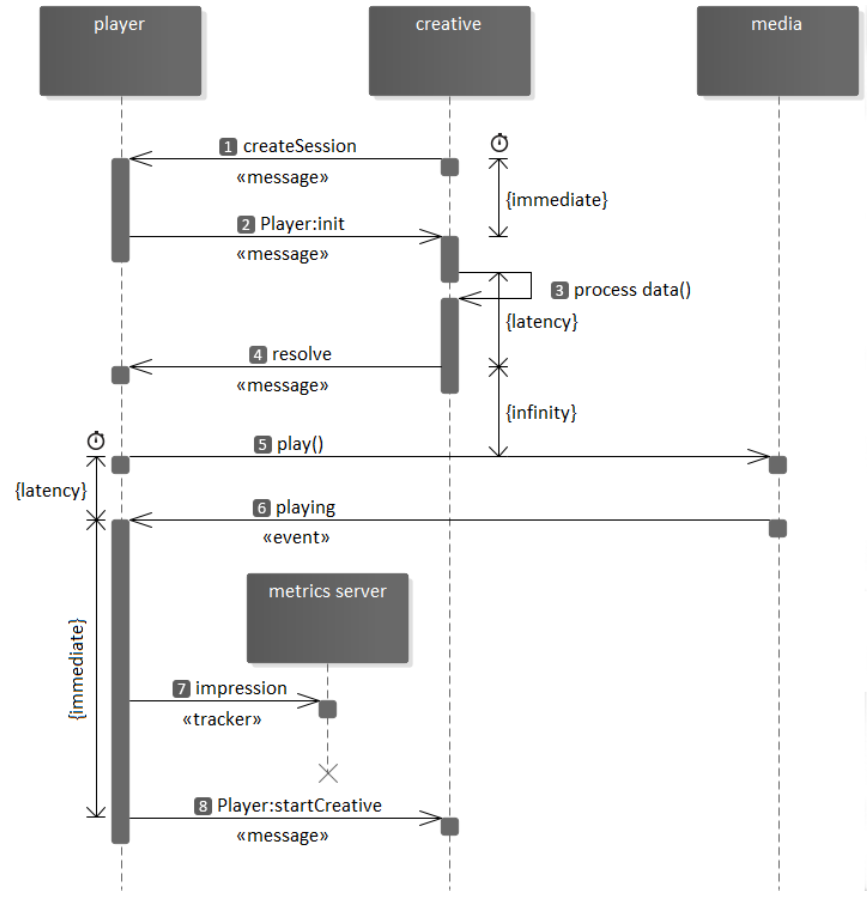
6.1How to Handle Ad Loading

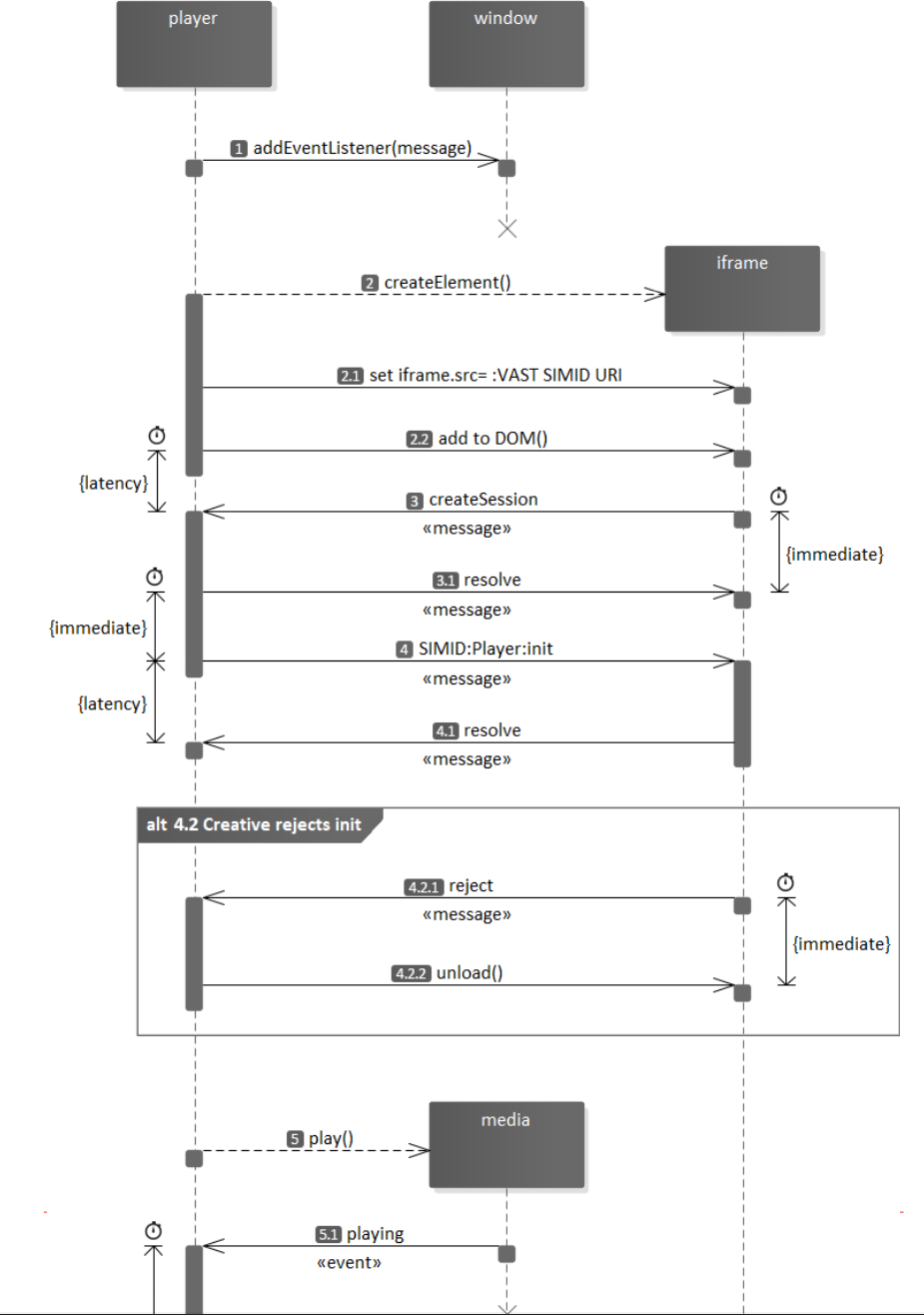
The player must follow this workflow for loading an ad. See Diagram - SIMID Loading and Initialization below.

  1. The player creates an iframe for the SIMID interactive component. The iframe should start hidden. While invisible, the iframe must be capable of executing JavaScript and loading resources.
  2. The player starts listening to the message event on the window that is the parent of the creative iframe.
  3. The player sets the iframe src attribute to the URL provided by the creative’s VAST element. The player must assume the iframe is crossorigin.
  4. The player waits until the creative initializes a session and posts createSession message (see § 8.4 Session Layer). The player responds to the session initialization with a resolve message.
  5. The player sends a § 4.3.7 SIMID:Player:init message with relevant parameters. The player waits until the creative responds with § 4.3.7.1 resolve. If the creative responds with § 4.3.7.2 reject, the player should unload the creative’s iframe.
  6. Where possible, to synchronize media playback and the creative UI, the player should wait until both the creative has responded to the § 4.3.7 SIMID:Player:init with § 4.3.7.1 resolve and the media is ready to play. Media readiness means sufficient payload arrived, and the first frame shows.
  7. When the media starts, the player sends a § 4.3.10 SIMID:Player:startCreative message. The creative should respond to § 4.3.10 SIMID:Player:startCreative message with § 4.3.10.1 resolve immediately.
  8. The player makes the iframe visible. With video ads, the player must position the iframe over media element at player’s upper-left corner and set iframe dimensions to media’s width and height.

*SIMID Loading and Initialization*

  1. Player starts listening to message event on the window.
  2. Player creates hidden iframe.
  3. Player sets iframe.src to the value of the VAST element.
  4. Player appends iframe to its container.
  5. Creative loads and posts createSession message.
  6. Player responds with resolve immediately.
  7. Player posts § 4.3.7 SIMID:Player:init immediately.
  8. Creative responds with § 4.3.7.1 resolve as soon as possible.
  9. Alternatively, the creative may reject Player:init. In such cases:
  10. Creative posts § 4.3.7.2 reject.
  11. Player unloads creative.
  12. Player initializes media at its discretion.
  13. Media playback begins.
  14. Player posts § 4.3.10 SIMID:Player:startCreative immediately.
  15. Creative should respond to Player:startCreative with § 4.3.10.1 resolve immediately.
  16. Player makes SIMID iframe visible.
6.2Typical Initialization WorkFlow

The ideal user ad experience has the simultaneous start of media playback and display of the interactive overlay (the SIMID creative). Once the SIMID creative recieves the Player:init message, its may not yet be ready to display (for example it maybe be loading assets). To accommodate this latency, the player posts a Player:init message before ad media playback begins and waits for the SIMID iframe to respond with § 4.3.7.1 resolve.

The player should post Player:init as soon as the creative dispatches a createSession message (section § 8.4.1 Establishing a New Session) Normal Ad Initilaizatioin Sequence, 12. SIMID creative code must be ready to process the Player:init message immediately 3).

After the player gets a resolve message Normal Ad Initilaizatioin Sequence, 4, it initializes media playback at its discretion 5. Once media rendering begins 6, the player reports impression 7and posts § 4.3.10 SIMID:Player:startCreative 8.

*Normal Ad Initilaization Sequence*

  1. Creative initializes the session.
  2. Player posts Player:init message immediately upon session creation.
  3. Creative proccesses initialization data and finalizes assets loading.
  4. Creative responds with § 4.3.7.1 resolve.
  5. Player starts media playback at its discretion.
  6. Media renders.
  7. Player reports impression.
  8. Player posts § 4.3.10 SIMID:Player:startCreative immediately.

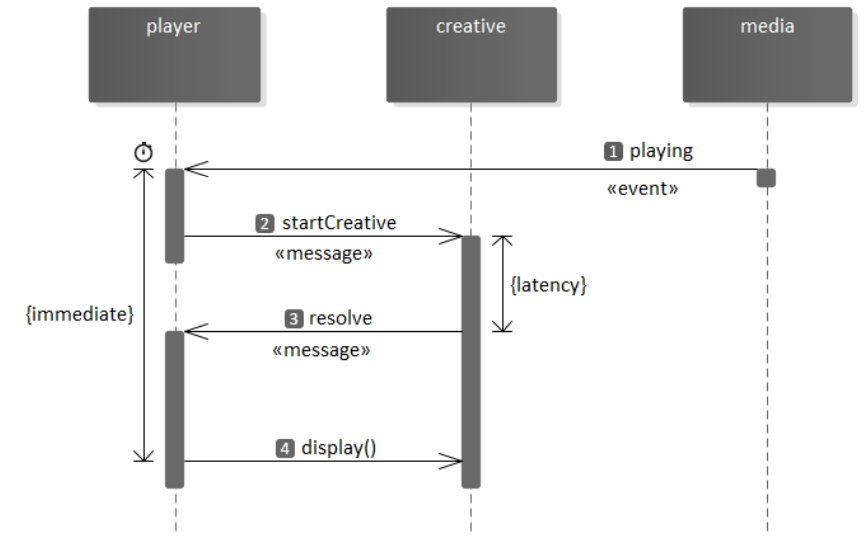
6.3. Typical Start Creative WorkFlow

6.3Typical Start Creative WorkFlow

*Normal Player:startCreative Sequence*

  1. Media playback begins.
  2. Player posts Player:startCreative.
  3. Creative responds with a resolve.
  4. Player displays the creative iframe.
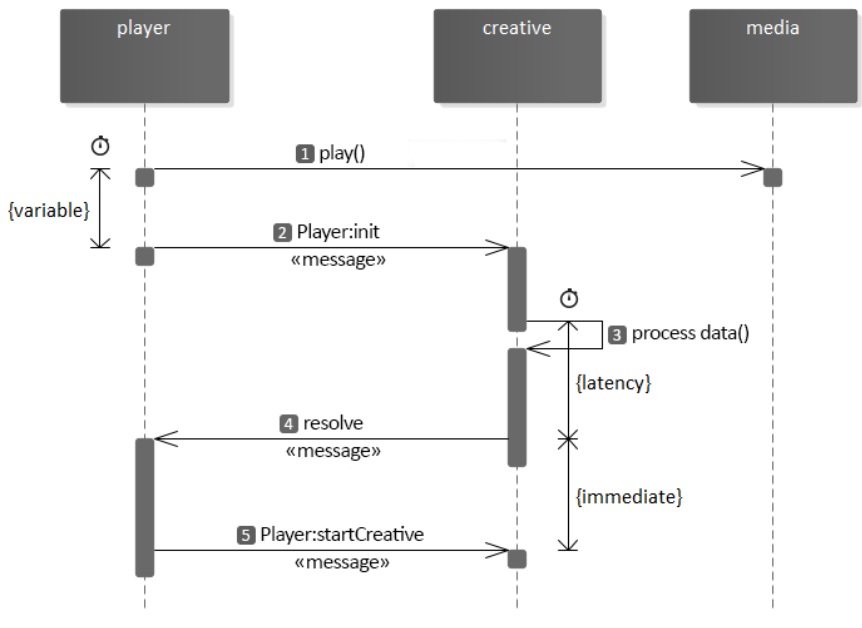
6.4Uninterrupted Initialization WorkFlow

In the case where publisher environments prohibit media playback interruptions, waiting for the creatives is not possible. The media player renders the ad media immediately - before the creative confirms its readiness (Special Creative Initialization Cases, 1). Some examples include SSAI and live broadcasts.

In these situations, the player keeps the iframe invisible and refrains from posting messages to the creative until it responds to the Player:init with a resolve message.

*Special Creative Initialization Cases*

  1. Player initializes ad media playback.
  2. Player posts Player:init message after ad media playback started.
  3. Creative proccesses initialization data and finalizes assets loading. Sub-loading routines may cause latencies.
  4. Creative responds with § 4.3.7.1 resolve.
  5. Player posts § 4.3.10 SIMID:Player:startCreative immediately.
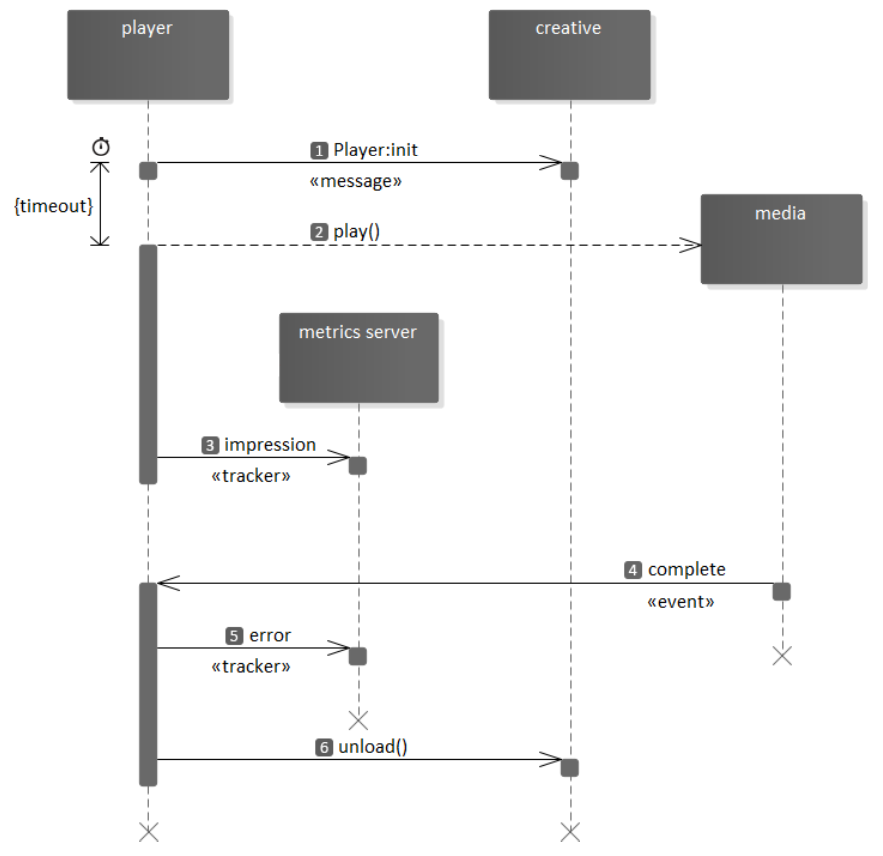
6.5Creative Delays Resolving Init

The interactive creative responding to a Player:init message with a resolve message is a critical step in the SIMID ad serving flow (Init Diagram, 4 above). The player keeps the SIMID iframe invisible and does not post either SIMID:Player or SIMID:Media messages until the iframe replies with a resolve message.

If the interactive creative fails to respond to a Player:init message within the allotted time, the player may continue with ad media rendering only (Player:init resolve 2).

The player maintains the hidden interactive creative until ad media playback completion.

If the interactive creative does not resume communication by the playback end, the player must report the VAST error tracker (if available) with the code 1212. See Player:init resolve 5).

*Player:init resolve delay*

  1. Player posts Player:init message and establishes a timeout.
  2. Player starts ad media playback upon timeout expiration.
  3. Player reports impression.
  4. Media playback completes.
  5. Player reports error tracker.
  6. Player unloads the iframe.
6.6Creative Rejects Init

The creative may respond with a reject based on its internal logic. In response to reject, the player proceeds with the ad media playback. The player may unload the iframe. The player reports VAST error trackers with the errorCode specified by the creative.

*Player:init reject Sequence*

  1. Player posts Player:init message.
  2. Creative responds with a reject.
  3. Player unloads the creative iframe.
  4. Player reports VAST error tracker.
  5. Player starts media.
6.7Nonlinear Initialization and Start WorkFlow
  1. The player creates a hidden iframe and loads the creative. This can happen before the ad display time to preload the ad.
  2. The creative will initialize a session.
  3. If the creative doesn’t initialize a session within a reasonable time, the player drops the creative and reports an error.
  4. The player sends a § 4.3.7 SIMID:Player:init message with relevant parameters.
  5. If the player can initialize, the creative responds with resolve.
  6. If the creative responds with reject, or doesn’t respond in time, the player drops the creative’s iframe and reports an error.
  7. When the player is ready to show the iframe, the player sends a § 4.3.10 SIMID:Player:startCreativemessage.
  8. If the creative responds with reject, or doesn’t respond in time, the player drops the creatives iframe and reports an error.
  9. When the creative responds with resolve, the player makes the iframe visible.
6.8How to Handle Ad Playback

The media player is responsible for ad media playback handling as well as tracking media related events. The SIMID creative manages interactive content and internal tracking related to interactivity.

6.8.1Ad Pause

If the variableDurationAllowed flag is set to true then the player should enable media pause by the SIMID creative via the SIMID:Creative:requestPause message. The player must respond to SIMID:Creative:requestPause with the AdPaused event.

When the SIMID creative would like to resume media playback, it should send a SIMID:Creative:requestPlay message. The player must respond to SIMID:Creative:requestPlay message with resolve and play the media.

6.8.2Ad Resizing and Fullscreen

The player may resize the ad slot. The player must send a § 4.3.9 SIMID:Player:resize message any time the ad slot size is changed.

If fullscreenAllowed is true, the SIMID creative may send a § 4.4.10 SIMID:Creative:requestFullscreenmessage. The player must resize only the ad slot to fullscreen (not the video). The SIMID creative then will resize the video as it sees fit. The player must send a § 4.3.9 SIMID:Player:resize message to the SIMID creative with fullscreen set to true and videoDimensions and creativeDimensions set to the fullscreen dimensions.

If player goes fullscreen on its own. Then the player must send a § 4.3.9 SIMID:Player:resize message to the SIMID creative with fullscreen set to true and videoDimensions and creativeDimensions set to the fullscreen dimensions.

6.9How to Handle Ad End and Unload

Following are cases where ad can end:

  1. Ad was skipped, either by player (see § 6.9.1 Player Skips Ad) or creative (See § 6.9.2 Creative Skips Ad).
  2. The creative has fired § 4.4.17 SIMID:Creative:requestStop message and the player has allowed the ad to stop.
  3. The player has fired § 4.3.2 SIMID:Player:adStopped message and the creative resolved.
  4. Ad errors out. See § 6.9.5 Ad Errors Out.
6.9.1Player Skips Ad

Skip Ad Handled by Player

  1. The player sends a § 4.3.1 SIMID:Player:adSkipped message to the ad.
  2. The player hides the creative.
  3. The creative may dispatch any tracking pixels via § 4.4.7 SIMID:Creative:reportTracking
  4. The creative may wait for § 4.4.7.1 resolve from the reportTracking message.
  5. The creative dispatches resolve on the adSkipped message § 4.3.1.1 resolve.
  6. The player fires any skip tracking pixels.
  7. The player unloads the ad.
6.9.2Creative Skips Ad

The creative requests ad skip by posting a SIMID:Creative:requestSkip message. If feasible, in response to requestSkip, the player terminates the ad and goes through the § 4.3.1 SIMID:Player:adSkipped message sequence.

Note: the SIMID interactive component implements skip related behavior and features ( Skip Ad button) only if the player delegates skippability to the creative - the value of § 4.3.7 SIMID:Player:init message args.environmentData.skippableState is "adHandles".

*Creative:requestSkip Sequence*

  1. Creative posts Creative:requestSkip message.
  2. Player hides the SIMID iframe.
  3. Player stops the ad media playback.
  4. Player responds with § 4.4.16.1 resolve.
  5. Player posts § 4.3.1 SIMID:Player:adSkipped message.
  6. Creative responds to Player:adSkipped with § 4.3.1.1 resolve.
  7. Player unloads the SIMID iframe.
6.9.3Ad Ends Before Media Completion

This scenario applies when the creative signal to the player to dismiss the ad, typically at the prompting of the user. A good example is a survey that allows the viewer to skip immediately to content when completed.

  1. The ad cleans up and dispatches § 4.4.17 SIMID:Creative:requestStop.
  2. The player unloads the ad.
6.9.4Ad Completes at Media Completion

When an ad finishes at the same time as its media.

  1. The player sends a § 4.3.2 SIMID:Player:adStopped message to the ad.
  2. The player hides the creative.
  3. The creative may dispatch any tracking pixels via § 4.4.7 SIMID:Creative:reportTracking
  4. The creative may wait for a § 4.4.7.1 resolve response message from the reportTracking message.
  5. The creative dispatches resolve on the adStopped message § 4.3.2.1 resolve.
  6. The player unloads the ad.
6.9.5Ad Errors Out

The SIMID creative or the player may terminate the ad unit with an error at any time. If the SIMID creative indicates an error, the player should try to stop ad unit playback. This might not be possible in server side stitched ads.

The player may error out if the ad does not respond with § 4.3.7.1 resolve in a reasonable amount of time.

When an player errors out it must follow these steps.

  1. The player sends a § 4.3.6 SIMID:Player:fatalError message to the ad.
  2. The player hides the creative.
  3. The creative may dispatch any tracking pixels via § 4.4.7 SIMID:Creative:reportTracking
  4. The creative may wait for a § 4.4.7.1 resolve response from the reportTracking message.
  5. The creative dispatches resolve on the fatalError message § 4.3.6.1 resolve.
  6. The player unloads the ad.
6.9.6Ad Requests Stop

The creative stops the ad by posting a SIMID:Creative:requestStop message.

If feasible, the player hides the iframe, stops media playback that is still in progress, and responds with a § 4.4.17.1 resolve. Subsequently, the player proceeds with the § 4.3.2 SIMID:Player:adStopped.

The SIMID interactive component engages ad stop functionality only if the player states its ability to vary ad duration. See § 4.3.7 SIMID:Player:init, Message.args.variableDurationAllowed details. The interactive component logic must expect that the player will unload SIMID iframe immediately upon posting a resolve response under the SIMID-compliant circumstances.

In the event the interactive component disregards or fails to accommodate player’s ability to resolve requestStop, the iframe remains visible and the player continues sending SIMID:Media and SIMID:Player messages. The creative should maintain communication with the player. See § 4.4.17.2 reject.

*Creative:requestStop Sequence*

  1. Creative posts Creative:requestStop message.
  2. Player hides the SIMID iframe.
  3. Player stops the ad media playback.
  4. Player responds with § 4.4.17.1 resolve.
  5. Player posts § 4.3.2 SIMID:Player:adStopped message.
  6. Creative responds to Player:adStopped with § 4.3.2.1 resolve.
  7. Player unloads the SIMID iframe.
6.10Ad Duration Changed Workflow
6.10.1Ad Extends Beyond Media Completion

This scenario is only possible when the variableDurationAllowed flag is set to true. Media duration must only be extended in response to user interaction.

  1. User interacts at any point during playback of the media, triggering extended ad portion. This is required. Ad duration cannot be extended as part of an automated process in the ad, such as adding an end card. Time for the end card must be allotted within the original duration of the ad.
  2. The Creative dispatches § 4.4.8 SIMID:Creative:requestChangeAdDuration message with the new duration.
  3. The ad enters its extended phase.
  4. The creative dispatches § 4.4.17 SIMID:Creative:requestStop when extended phase is finished.
6.10.2Ad Duration Changed Workflow - Known Time

*Known Ad Duration Change Sequence*

  1. Player starts countdown. Countdown depends on the media progress.
  2. Creative posts requestChangeAdDuration with the duration value greater than zero.
  3. Player modifies countdown that now depends on the specified by the creative ad duration.
  4. Countdown finishes.
  5. Player receives countdown completion notification.
  6. Player posts § 4.3.2 SIMID:Player:adStopped message.
6.10.3Ad Duration Changed Workflow - Unknown Time

*Unknown Ad Duration Change Sequence*

  1. Player starts countdown. Countdown depends on the media progress.
  2. Creative posts requestChangeAdDuration with the duration value -2.
  3. Player stops countdown.
  4. Creative posts § 4.4.17 SIMID:Creative:requestStop message.
6.11User Experience

Both ad creatives and media players should ensure that consumers are presented with a good ad experience.

This specification does not define the user experience for a close control (close button) or other generic media interaction behavior by the ad creative or the media player. The publisher media player is in full control over its user experience and can present its controls (or hide them) as needed. The publisher media player may dismiss the ad creative at any point in time. Some implementations may have a publisher provided close control, as well as various other controls, and others may not.

The ad creative can also request to be dismissed at any point in time. An ad creative may opt to show its own controls, including a close control.

官方报文示例

示例照录官方代码块。它们多为键未加引号的 JS 对象字面量,可直接粘进报文解析器验证。

8.1.1Data StructureJS literal

{
sessionId: "173378a4-b2e1-11e9-a2a3-2a2ae2dbcce4",
messageId: 10,
timestamp: 1564501643047,
type: "SIMID:Player:adStopped",
args: {
code: 0
}
}

8.2.1resolve MessagesJS literal

{ sessionId: "173378a4-b2e1-11e9-a2a3-2a2ae2dbcce4",
messageId: 10,
timestamp: 1564501643047,
type: "resolve",
args: {
messageId: 5,
value: {
id: 45
}
}
}

8.2.2reject MessagesJS literal

{
sessionId: "173378a4-b2e1-11e9-a2a3-2a2ae2dbcce4",
messageId: 10,
timestamp: 1564501643047,
type: "resolve",
args: {
messageId: 5,
value: {
errorCode: 902,
message: "The feature is not available."
}
}
}

8.4.1Establishing a New SessionJS literal

{
sessionId: "173378a4-b2e1-11e9-a2a3-2a2ae2dbcce4",
messageId: 0,
timestamp: 1564501643047,
type: "createSession",
args: { }
}

在报文解析器中打开