38 msg · 36 resp · 36 err · 22 flow
Markdown · SIMID 1.2.md
The Secure Interactive Media Interface Definition (SIMID) specifies the messaging protocol between the media player and the executable ad creative: the creative is sandboxed inside a cross-origin iframe, both sides exchange serialized messages over postMessage, and neither calls the other's functions or touches the other's DOM. It takes over the interactivity role from VPAID, alongside OMID which handles measurement and verification.
38 messages · 36 response sections · 36 error codes · 22 workflow sections
Body text is the IAB Tech Lab English original, reproduced verbatim — the site does not rewrite, summarise or translate it; section order and table structure follow the source.
Every SIMID design constraint follows from one fact: the creative and the player live in separate security sandboxes.
Contract essentials
The table below reproduces the official §2.1 comparison verbatim, to scope the impact when migrating existing creatives.
| Feature | VPAID | SIMID |
|---|---|---|
| Security | Creative directly accesses player DOM and shared global JavaScript context. | Creative is sandboxed into a crossorigin iframe. No player DOM access or shared JavaScript context. |
| Ad media asset management | Creative manages ad video loading and playback. | Player manages ad media loading and playback (audio or video). |
| Pre-caching | Only the VPAID script can be reliably pre-cached. Video asset cannot be pre-cached. | Audio or video asset and SIMID creative can both be pre-cached. |
| Errors influence on performance or UX | Fatal script errors from ad creative can result in significant player or publisher site performance and user experience deterioration (due to shared security sandbox). | Fatal script errors from ad creative do not affect player or publisher site directly. Impact is limited to performance and user experience of the creative, only. |
| SSAI feasibility | SSAI is not possible. | Interactive creatives can be rendered in SSAI context. |
| Latencies | Publishers are at the mercy of VPAID creative implementation efficiency and uncontrollable internal processes (verification, trading, wrapping, etc.). Each of these behaviors can impose significant latencies. | Players can pre-load media and creative assets due to maintaining full control over decisioning, loading and displaying of the ad unit. Ad decisioning latency is removed, risks of internal processes are minimized due to separate security sandboxes. |
| API | Both the player and creative must support specific JavaScript functions. Each component calls functions directly on the other in a shared security sandbox (insecure). | No functions are directly called on either component by the other. All communication is achieved using standard postMessage API and SIMID messaging protocol across separate security sandboxes. |
| Ad blocking | VPAID can prevent an ad from rendering. | SIMID is built for interactivity and was not designed for ad blocking. The Open Measurement SDK (OMID) is expected to support this capability in the future. |
| Verification services | Verification features can be fully implemented and executed in shared DOM and global Javascript context. | SIMID creative cannot access any DOM, elements, or JS context outside of its own security sandbox so is unable to handle any verification use cases. OMID handles the use case for verification allowing SIMID to be focused on interactivity only. |
| Creative wrapping | VPAID ads can load other ads (including other VPAID ads). | Cannot be executed. |
| Audio advertising | Out of standard scope. | Enables interactive components serving with audio ads. |
| Environment constraints | Player must be an HTML video element. | Player can be native or web so long as the SIMID creative has sandboxed DOM access (such as a web view). |
| Resource MIME type | application/javascript | text/html |
SIMID defines no signalling of its own: the interactive layer arrives as a VAST resource — InteractiveCreativeFile for linear creatives, NonLinear/IFrameResource for non-linear ones, both with apiFramework set to SIMID.
The VAST 4.x response designates the element to describe the ad’s interactive component data. For SIMID, element must include the following required attributes and their values: type="text/html" and apiFramework="SIMID".
<InteractiveCreativeFile type="text/html" apiFramework="SIMID"
variableDuration="true">
<![CDATA[https://adserver.com/ads/creative.html]]>
</InteractiveCreativeFile>
The value of the apiFramework attribute identifies SIMID as the required API for the creative. Players that do not support the SIMID API may load an audio or video file included with the ad, but they will not load or play the SIMID creative.
Media players that do support the SIMID API should handle version negotiation between the creative and the media player via the § 6.1 How to Handle Ad Loading algorithm. The SIMID API version is not identified by any element or attribute in the VAST file.
A third, optional attribute which may be included on the InteractiveCreativeFile element is variableDuration="true". If present, this attribute indicates that the ad unit is only playable if the media player allows the creative to pause playback of the ad’s audio or video and extend the duration of the ad break (for example, with interactive content such as a game or survey). If the player does not support or allow this capability, then it must not render the current ad’s audio/video or SIMID creative. The player should error out the ad instead (and either resume its primary content or continue on to the next ad in the current ad pod).
Non-linear and L-shaped ads
A non-linear creative only has collapsed / expanded states and ships no media asset; expanding requires the player to pause the main content. L-shaped (squeeze back) ads work by cropping the video and overlaying the creative in the blank area — SIMID does not support L-shapes achieved by resizing the player.
VAST supports nonlinear ads since version 2.0 including interactive ads that implement API frameworks.
VAST response describes nonlinear ads in the node children. The node attribute’s apiFramework value is SIMID. The node delivers a URI to the SIMID interactive component. The node contains custom ad data for the creative’s consumption.
<Creative>
<NonLinear>
<IFrameResource type="text/html" apiFramework="SIMID">
<![CDATA[https://adserver.com/videoads/simidshell.html]>
</IFrameResource>
<AdParameters>
<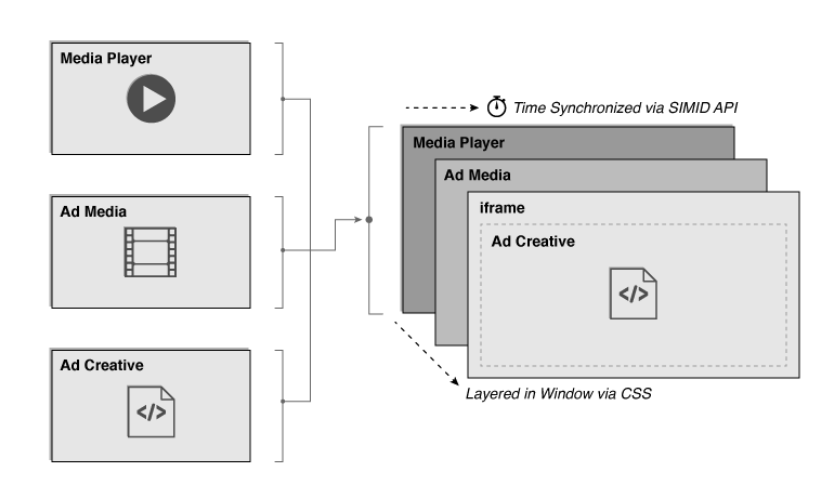
A diagram showing SIMID ads sandboxed from the publisher player environment
SIMID is part of a broader effort to replace the older VPAID standard (more details in this blog post by the IAB Tech Lab). While Open Measurement replaces the use case of verification and measurement, SIMID replaces the use case of interactive streaming media ads, the original intended purpose of the VPAID standard. SIMID provides a path for VPAID deprecation and allows the industry to move to more secure and transparent standards. SIMID aims to gain broad industry adoption by ensuring that the standard is focused on the primary use case of interactivity.
*VPAID vs. SIMID APIs*
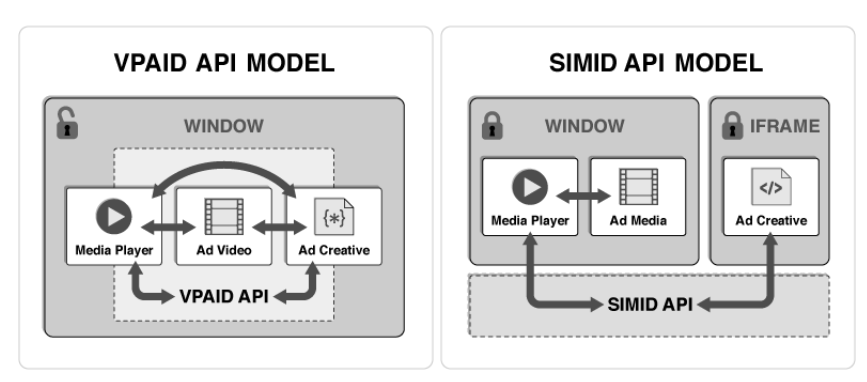
SIMID vs. VPAID Comparison.
| Feature | VPAID | SIMID |
|---|---|---|
| Security | Creative directly accesses player DOM and shared global JavaScript context. | Creative is sandboxed into a crossorigin iframe. No player DOM access or shared JavaScript context. |
| Ad media asset management | Creative manages ad video loading and playback. | Player manages ad media loading and playback (audio or video). |
| Pre-caching | Only the VPAID script can be reliably pre-cached. Video asset cannot be pre-cached. | Audio or video asset and SIMID creative can both be pre-cached. |
| Errors influence on performance or UX | Fatal script errors from ad creative can result in significant player or publisher site performance and user experience deterioration (due to shared security sandbox). | Fatal script errors from ad creative do not affect player or publisher site directly. Impact is limited to performance and user experience of the creative, only. |
| SSAI feasibility | SSAI is not possible. | Interactive creatives can be rendered in SSAI context. |
| Latencies | Publishers are at the mercy of VPAID creative implementation efficiency and uncontrollable internal processes (verification, trading, wrapping, etc.). Each of these behaviors can impose significant latencies. | Players can pre-load media and creative assets due to maintaining full control over decisioning, loading and displaying of the ad unit. Ad decisioning latency is removed, risks of internal processes are minimized due to separate security sandboxes. |
| API | Both the player and creative must support specific JavaScript functions. Each component calls functions directly on the other in a shared security sandbox (insecure). | No functions are directly called on either component by the other. All communication is achieved using standard postMessage API and SIMID messaging protocol across separate security sandboxes. |
| Ad blocking | VPAID can prevent an ad from rendering. | SIMID is built for interactivity and was not designed for ad blocking. The Open Measurement SDK (OMID) is expected to support this capability in the future. |
| Verification services | Verification features can be fully implemented and executed in shared DOM and global Javascript context. | SIMID creative cannot access any DOM, elements, or JS context outside of its own security sandbox so is unable to handle any verification use cases. OMID handles the use case for verification allowing SIMID to be focused on interactivity only. |
| Creative wrapping | VPAID ads can load other ads (including other VPAID ads). | Cannot be executed. |
| Audio advertising | Out of standard scope. | Enables interactive components serving with audio ads. |
| Environment constraints | Player must be an HTML video element. | Player can be native or web so long as the SIMID creative has sandboxed DOM access (such as a web view). |
| Resource MIME type | application/javascript | text/html |
The SIMID standard is geared toward the digital media advertising community. Anyone who works with digital media advertising products or services can benefit from reading the Introduction sections of this document. The Messaging Protocol, API Reference, and later sections predominantly target software engineers.|
SIMID version 1.2 introduces the following enhancements:
Throughout this document, the SIMID interactive component is referred to as a “SIMID creative” or “creative”.
Compliance with SIMID requires support for all features and behaviors specificied in this document, unless a given feature or behavior is explicitly designated as optional. Standard RFC language will be used. See https://tools.ietf.org/html/rfc2119 for RFC 2119 for enforcement terminology used in this standard.
*SIMID Assets loading*
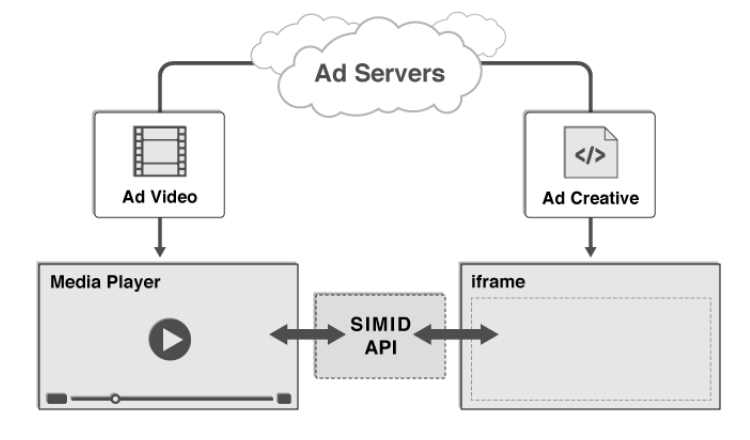
A SIMID creative can be included in a VAST document by way of an element. The text within this element must be a url which returns an HTML document. When loaded into an iframe by a media player, this HTML document will define the SIMID creative’s content, and will direct the web browser or host application to load any additional assets required by that creative (images, CSS, scripts, etc.).
The element is defined as a child of the element in VAST 4.0. For more technical details, see the § 5 Referencing a SIMID creative from VAST section.
<MediaFiles>
<MediaFile>
<![CDATA[https://example.com/mediafile.mp4]]>
</MediaFile>
<InteractiveCreativeFile type="text/html" apiFramework="SIMID" variableDuration="true">
<![CDATA[https://adserver.com/ads/creative.html]]>
</InteractiveCreativeFile>
</MediaFiles>The SIMID ad experience is delivered by a web browser or application concurrently rendering an ad’s streaming audio or video file and its interactive creative file. The media player obtains urls for both files from a VAST document, loads the files, assembles them into a single ad unit, and ensures a cohesive ad experience.
*SIMID creative loading and presentation process.*
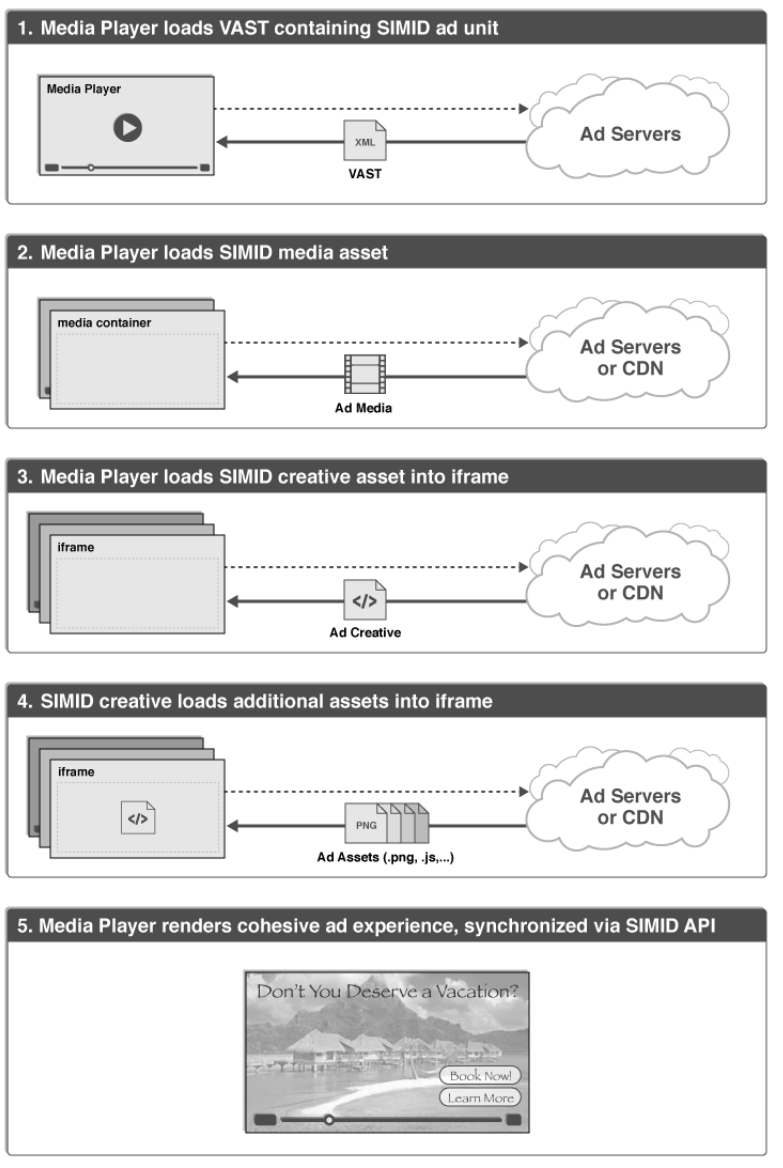
A media player and a SIMID creative communicate by sending serialized messages back and forth to each other.
Because a SIMID creative is an HTML document that is served from an advertiser’s web domain, and it is loaded by a media player into an iframe within a web page hosted on a different domain, loading the creative requires the creation of a cross-origin iframe (also known as an "unfriendly iframe"). Due to browser sandbox security restrictions, JavaScript communication across this type of iframe can only be achieved via the standard postMessage API.
SIMID API requirements govern message construction conventions as well as the message data structure. See sections § 8 Messaging Protocol, § 4 API Reference for more information.
While SIMID was designed to support interactive video creative, SIMID can also be used to handle interactive audio without the visual component. Interactivity in an audio-only creative can take advantage of SIMID controls to pause, play, seek, and skip. SIMID can also help with performance by reporting on media events and any errors.
The use of SIMID features in audio player must maintain an internet connection. For audio content that is downloaded and executed offline, SIMID features will be inoperable.
The use of HTML is only required for the SIMID creative, not the publisher property hosting that creative. As long as the publisher can load HTML and communicate with it over the standard postMessage API, it can support SIMID. In practice, this means that SIMID can be hosted in web page iframes, mobile app web views, and other platforms. In fact, SIMID can better support mobile use cases than VPAID because a native app or media player directly controls loading and playback of a SIMID ad unit’s media asset (whereas a VPAID ad unit offers no direct access or control of its internal media asset).
Note: Certain devices, including TV sets and OTT boxes, restrict loading of external assets, have limited HTML rendering capabilities, or are unable to display HTML along with audio or video. These devices are incapable of implementing SIMID. Devices that support HTML and JavaScript can support SIMID - on both client side as well as in server side ad insertion scenarios
SIMID cannot be used to decide which media to show on the client pre-impression. This is because the media file must be present alongside the SIMID creative and delivered via the VAST MediaFile node.
SIMID should not be set up to measure viewability. IAB Tech Lab offers resources for measurement in its Open Measurement initiative. For more information, please visit:
iabtechlab.com/standards/open-measurement-sdk/
Any use of the SIMID spec to support something other than interactive or dynamic content within the ad unit is counter to the intentions of this spec.
Compliance with current privacy regulations involve actions that occur during the transaction on the ad and before SIMID is loaded. As long as the ad is contained in a SIMID container, it cannot access any data the publisher may have in the player app or the environment where the player is installed (web page, mobile device, etc.). Please visit iabtechlab.com to learn more about what IAB Tech Lab offers in support of your efforts to respect the privacy of consumers’ data.
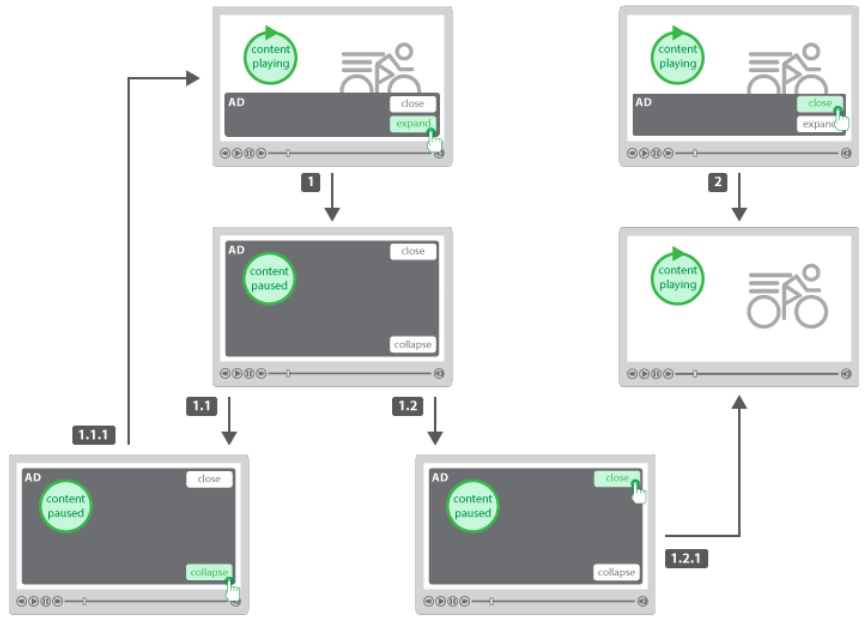
Nonlinear ads are served and displayed concurrently with the primary media content. In video players, nonlinear ads overlay a portion of the video.
Nonlinear ads implement two states: collapsed and expanded. The player renders the nonlinear ad in the original state, collapsed, while media content progresses uninterrupted. The expanded ad state typically occupies the entire player viewport and requires the media content to be paused. The expanded state of the nonlinear ad usually occurs via user interaction with the creative.
Unlike the linear ads, there is no media asset that the player needs to render with a nonlinear ad.
SIMID supports nonlinear ads by providing a nonlinear specific API. Both linear and nonlinear ads share the same communication protocol and data providers. As with linear ads, the interactive creative is a single resource that the player loads into a cross-origin iframe.
*Nonlinear Ad User Experience*
SIMID already supports L shape ads. As a creative vendor, you should have access to the media files for the ad as well as the interactive creative files. Using these two things, you can create an L shape ad experience using SIMID.
The video asset will need to be cropped or resized to allow the interactive creative to be put into the correct place. This means replacing the part that the interactive creative would cover with blank areas. Effectively, you are shrinking the effective size of the video to fit the new window that’s created when the interactive creative overlay is placed over it. Since the video and interactive asset are coming from the same source, when you know you want an L shape ad experience, serve the proper cropped video along with the interactive creative and a SIMID enabled player should play the video and overlay the interactive creative over the blank spots which preserves the L shape ad experience.
While this takes some work on the video size, it can also be achieved by making the parts of the video that the interactive creative overlays a less relevant part of the video ad. Meaning, if the overlay is covering those parts of the video, minimal information is lost. This is the second way L shaped ads can run right now.
SIMID does not support L shaped ads that resize the video player without an overlay covering the video. Video assets and interactive creatives should be able to work together to achieve the same result.
VAST supports nonlinear ads since version 2.0 including interactive ads that implement API frameworks.
VAST response describes nonlinear ads in the node children. The node attribute’s apiFramework value is SIMID. The node delivers a URI to the SIMID interactive component. The node contains custom ad data for the creative’s consumption.
<Creative>
<NonLinear>
<IFrameResource type="text/html" apiFramework="SIMID">
<![CDATA[https://adserver.com/videoads/simidshell.html]>
</IFrameResource>
<AdParameters>
<![CDATA[{adid:345893,cturi:"https://mycar.com/modelS.html"}]>
</AdParameters>
</NonLinear>
</Creative>These differences are detected automatically in the official text during collection and reproduced as-is (the site neither corrects nor overrides them). They explain where the document, player implementations and this table may disagree.
| Version | Type | Detail |
|---|---|---|
| 1.2.0 | reference-table-incomplete | 正文有但 §4.1 总表未列出:SIMID:Creative:requestNavigation |
| 1.2.0 | summary-vs-webidl-mismatch | SIMID:Player:resize: 汇总表写 mediadimensions,WebIDL 无此字段(实际 videodimensions/creativedimensions/fullscreen) |
| 1.2.0 | response-subsection-unlisted | 正文存在响应小节但 §4.1 标 n/a:SIMID:Creative:clickThru.resolve, SIMID:Creative:clickThru.reject |
| 1.2.0 | media-event-table-misplaced | 「Required and optional media event types」表在 §4.2 只有表题、表格实体落在「Messages from the player」节末尾;站内按表头特征认领,不改写归属 |
| 1.2.0 | example-not-strict-json | 4 处官方报文示例为 JS 对象字面量(键未加引号),非严格 JSON;站内已存 raw + repaired 两份,解析器按 repair 后校验 |
| 1.2.0 | reject-example-type | §8.2.2 reject Messages 的示例把 Message.type 写成 "resolve",与同节正文要求(must be reject)矛盾 |
| 1.2.0 | non-webidl-type | 官方类型名不合 WebIDL 或无法解析:MessageArgs.trackingUrls:Array, MessageArgs.uri:string, SIMID:Creative:reportTracking.trackingUrls:Array, SIMID:Creative:requestNavigation.uri:string |
| 1.2.0 | markdown-table-malformed-row | 表格行缺起始竖线(原文排版缺陷):Reference Table 1 行 |
| 1.2.0 | official-typo-preserved | 以下拼写/断词为官方原文所有,站内照录未修正:"Creaitve"(§4.4.3 正文);"creatigve"(§3.6 非线性交互列表);"proccesses"(§6.2/§6.4 时序步骤);"Initilaizatioin"(§6.2 图题);"interuppted"(§4.2 媒体事件表行名);"startCreativemes"(§9 错误码 1213 描述断词);"expandNonline"(§9 错误码 1222 描述断词) |
| 1.1.0 | reference-table-incomplete | 正文有但 §4.1 总表未列出:SIMID:Creative:requestNavigation |
| 1.1.0 | summary-vs-webidl-mismatch | SIMID:Player:resize: 汇总表写 mediadimensions,WebIDL 无此字段(实际 videodimensions/creativedimensions/fullscreen) |
| 1.1.0 | response-subsection-unlisted | 正文存在响应小节但 §4.1 标 n/a:SIMID:Creative:clickThru.resolve, SIMID:Creative:clickThru.reject |
| 1.1.0 | example-not-strict-json | 4 处官方报文示例为 JS 对象字面量(键未加引号),非严格 JSON;站内已存 raw + repaired 两份,解析器按 repair 后校验 |
| 1.1.0 | non-webidl-type | 官方类型名不合 WebIDL 或无法解析:MessageArgs.trackingUrls:Array, MessageArgs.uri:string, SIMID:Creative:reportTracking.trackingUrls:Array, SIMID:Creative:requestNavigation.uri:string |
| 1.1.0 | official-typo-preserved | 以下拼写/断词为官方原文所有,站内照录未修正:"Initilaizatioin"(§6.2 图题);"expandNonline"(§9 错误码 1222 描述断词) |
| 1.0.1 | summary-vs-webidl-mismatch | SIMID:Player:resize: 汇总表写 mediadimensions,WebIDL 无此字段(实际 videodimensions/creativedimensions/fullscreen) |
| 1.0.1 | example-not-strict-json | 4 处官方报文示例为 JS 对象字面量(键未加引号),非严格 JSON;站内已存 raw + repaired 两份,解析器按 repair 后校验 |
| 1.0.1 | reject-example-type | §8.2.2 reject Messages 的示例把 Message.type 写成 "resolve",与同节正文要求(must be reject)矛盾 |
| 1.0.1 | non-webidl-type | 官方类型名不合 WebIDL 或无法解析:MessageArgs.trackingUrls:Array, SIMID:Creative:reportTracking.trackingUrls:Array |
| 1.0.1 | official-typo-preserved | 以下拼写/断词为官方原文所有,站内照录未修正:"Initilaizatioin"(§6.2 图题) |
| 1.0.0 | example-not-strict-json | 1 处官方报文示例为 JS 对象字面量(键未加引号),非严格 JSON;站内已存 raw + repaired 两份,解析器按 repair 后校验 |
| 1.0.0 | prose-type-names | 1.0 的散文参数用了 int / number 这类实现语言类型名(1.0.1 起改为 WebIDL 标量):SIMID:Media:timeupdate.currentTime:number, SIMID:Media:volumechange.volume:number, SIMID:Player:adStopped.code:int, SIMID:Creative:clickThru.x:int, SIMID:Creative:clickThru.y:int, SIMID:Creative:fatalError.errorCode:int, SIMID:Creative:reportTracking.reject.errorCode:int, SIMID:Creative:requestChangeAdDuration.duration:int |
| 1.0.0 | official-typo-preserved | 以下拼写/断词为官方原文所有,站内照录未修正:"paramaters"(1.0 参数段标签拼写);"ackPromise"(1.0 的 Promise 机制术语) |
| 1.0.0 | section-number-skew | 渲染稿章节编号与规范正文不一致:Error Codes 标为 §8.4、Terminology 标为 §9(站内结构按标题定位,编号仅作展示) |
| 1.0.0 | args-notation-prose | 10 条消息的参数在官方稿里是「name(Type): 描述」散文列表而非 WebIDL(1.0 的写法),站内归一为同一 args 结构并标 argsSource="prose-list";另有 22 条官方未给参数结构 |
Collected on 2026-10-04 from the official IAB Tech Lab repository (commit pinned), licensed CC BY-NC-ND 4.0(index.bs metadata 的 License 声明);同一文件另附 Open Web Foundation 1.0 声明,两处口径并存; checksums of the four source documents and the inconsistencies found in them are recorded in PROVENANCE.
Open the official specification ↗
Known gaps
Protocol reference · works with VAST Debugger and HTML5 Ad Tools · VAST · OMID · AdCOM